
Plane Geometry Problem Involving the Dot Product
Loading the math board and drawing, please wait…
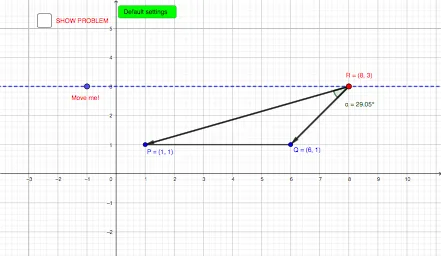
This GeoGebra example demonstrates a plane geometry problem centered around the application of the vector dot product. It visually represents how geometric constraints translate into algebraic vector equations, helping users grasp the geometric interpretation of the dot product, such as projections, angles, and orthogonality. Core mathematical concepts include vector algebra, coordinate geometry, vector components, magnitudes, and the dot product formula. To construct this model, various GeoGebra commands are employed, including Line, Point, Segment, Angle, Vector, and Length to define geometric objects like points P, Q, D and vectors u, v. The construction dynamically tracks vector components (ux, uy, vx, vy), magnitudes (lu, lv), and computes the dot product (dott) to update the problem text (Problemtxt) in real-time. This example is highly suitable for high school or introductory college students studying linear algebra, vector calculus, and coordinate geometry, serving as an interactive visual aid for vector operations and geometric proofs.
GeoGebra Commands & Parameters
Line(D, xAxis) → fPoint(f) → RSegment(P, R) → gSegment(Q, R) → hSegment(P, Q) → iAngle(P, R, Q) → αVector(R, P) → uVector(R, Q) → vLength(u) → luLength(v) → lv
AI Drawing Prompt Reference
Draw a plane geometry figure with points P, Q, and D, and segments PQ, PR, and QR formed by these points. Construct point R on line segment PR, then draw segments PQ and QR to form a triangle. Next, draw vectors u from R to P and v from R to Q, calculate and display the lengths lu and lv of vectors u and v. Finally, compute the dot product of vectors u and v and dynamically update the problem text to show the result.
The prompt above was compiled from the original drawing commands and is for reference only.