
Plücker Conic Construction and Analysis
Loading the math board and drawing, please wait…
In collections
geometriadinamica.es
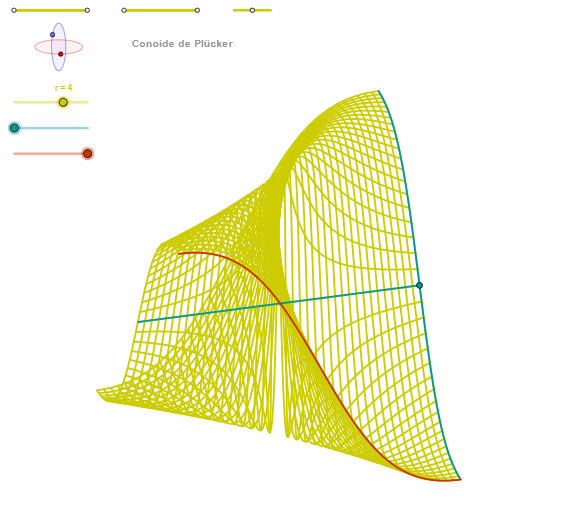
This example demonstrates the construction and analysis of the Plücker conic. Key mathematical concepts include conic sections, geometric construction, coordinate geometry, and locus theory. The construction involves GeoGebra commands such as Segment, OrthogonalLine, Circle, Ellipse, and Angle, along with CurveCartesian for dynamic visualization. Suitable for high school students or undergraduate learners in geometry and coordinate geometry.
GeoGebra Commands & Parameters
Segment(Q3, Q4) → p2Point(p2) → P3Segment(P3, Q4) → p4Point(p4) → P4Segment(Q1, Q2) → p1Point(p1) → P1Segment(P1, Q2) → p3Point(p3) → P2OrthogonalLine(C, yAxis) → zz1Circle(C, 0.62) → zz0Intersect(zz0, zz1, 1) → ZZ1Intersect(zz0, zz1, 2) → ZZ2Ellipse(ZZ1, ZZ2, 0.65) → zElipse1Intersect(zElipse1, zz1) → ZZ5, ZZ6Point(zElipse1) → XYAngle(ZZ6, C, XY) → zAngRotOrthogonalLine(C, xAxis) → zz2Intersect(zz0, zz2, 2) → ZZ3Intersect(zz0, zz2, 1) → ZZ4Ellipse(ZZ3, ZZ4, 0.65) → zElipse2Intersect(zElipse2, zz2) → ZZ7, ZZ8Point(zElipse2) → ZAngle(ZZ8, C, Z) → zAngIncSegment(Q5, Q6) → p5Point(p5) → P5CurveCartesian(((r * u) * sin(zAngRot)), (r * (((-u) * cos(zAngRot)) * sin(zAngInc))), u, u1, u2) → curva1Segment(ZZ5, ZZ6) → zz4Segment(ZZ7, ZZ8) → zz3Intersect(zElipse2, zElipse1, 1) → zPunto1Intersect(zElipse2, zElipse1, 4) → zPunto2Segment(zPunto1, zPunto2) → zSeg2CurveCartesian((r * ((α * sin(zAngRot)) + (v * cos(zAngRot)))), (r * ((((-α) * cos(zAngRot)) * sin(zAngInc)) + ((v * sin(zAngRot)) * sin(zAngInc)) + (((2 * α) * v / (α^(2) + v^(2))) * cos(zAngInc)))), v, v1, v2) → curva2CurveCartesian((r * ((u * sin(zAngRot)) + (β * cos(zAngRot)))), (r * ((((-u) * cos(zAngRot)) * sin(zAngInc)) + ((β * sin(zAngRot)) * sin(zAngInc)) + (((2 * u) * β / (u^(2) + β^(2))) * cos(zAngInc)))), u, u1, u2) → aSequence(CurveCartesian[(r * ((u * sin(zAngRot)) + (v * cos(zAngRot)))), (r * ((((-u) * cos(zAngRot)) * sin(zAngInc)) + ((v * sin(zAngRot)) * sin(zAngInc)) + (((2 * u) * v / (u^(2) + v^(2))) * cos(zAngInc)))), u, u1, u2], v, v1, v2, paso) → list3Sequence(CurveCartesian[(r * ((u * sin(zAngRot)) + (v * cos(zAngRot)))), (r * ((((-u) * cos(zAngRot)) * sin(zAngInc)) + ((v * sin(zAngRot)) * sin(zAngInc)) + (((2 * u) * v / (u^(2) + v^(2))) * cos(zAngInc)))), v, v1, v2], u, u1, u2, paso) → list1
AI Drawing Prompt Reference
Start by defining a center point and drawing a circle centered at it. Construct a line perpendicular to the y-axis and another line perpendicular to the x-axis, both intersecting the circle to produce four intersection points. Use each pair of opposite points as foci to draw two ellipses of equal size but oriented perpendicularly to each other. Connect the intersection points of each ellipse with the respective perpendicular lines to form line segments. Select a point on the first ellipse and create an angle using the center point and another point on the ellipse; do the same on the second ellipse to create a second angle. Using these two angles as rotation parameters and the center point as origin, based on the ellipse intersection segments and angles, draw several parametric curves forming a family of conic sections.
The prompt above was compiled from the original drawing commands and is for reference only.