
Pizzas, Friends, Division, and Fractions
Loading the math board and drawing, please wait…
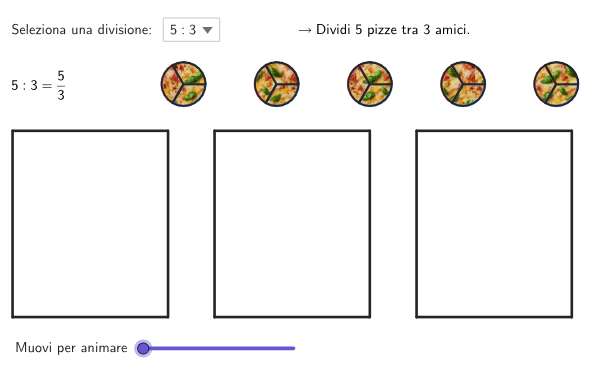
This example visually demonstrates the concepts of division and fractions through pizza slices and friends. It covers core math concepts like division, fractions, surfaces, percentages, parametric equations, functions, and parallelepipeds. It is constructed using GeoGebra commands and objects such as Vector, Corner, RandomElement, Circle, Translate, Polygon, Sequence, CircleSector, Take, Zip, and SelectedIndex, making it suitable for middle school and above students to learn and understand division, fractions, and their applications.
GeoGebra Commands & Parameters
Vector(C1, C2) → cTraCorner(5) → dimsRandomElement({3, 2}) → bFiveCircle(C1, rCfr) → cCircle(C2, rCfr) → dTranslate(C2, cTra) → C3Circle(C3, rCfr) → eTranslate(C3, cTra) → C4Circle(C4, rCfr) → fTranslate(C4, cTra) → C5Circle(C5, rCfr) → gVector(R1, F) → qTraPolygon(R1, R2, R3, R4) → q1, r1, r2, r3, r4Translate(R1, qTra) → R1'Translate(R2, qTra) → R2'Translate(R3, qTra) → R3'Translate(R4, qTra) → R4'Polygon(R1', R2', R3', R4') → q2, r1', r2', r3', r4'Translate(R1', qTra) → R1''Translate(R2', qTra) → R2''Translate(R3', qTra) → R3''Translate(R4', qTra) → R4''Polygon(R1'', R2'', R3'', R4'') → q3, r1'', r2'', r3'', r4''Sequence(Rotate[A, ((2 * pi / b) * k), C1], k, 1, b) → settCfr1CircleSector(C1, A, settCfr1(1)) → settc1puCircleSector(C1, settCfr1(1), settCfr1(2)) → settc1piCircleSector(C1, settCfr1(2), settCfr1(3)) → settc1blTranslate(settc1pu, cTra) → settc2puTranslate(settc1pu, Vector[(2 * cTra)]) → settc3puTranslate(settc1pu, Vector[(3 * cTra)]) → settc4puTranslate(settc1pu, Vector[(4 * cTra)]) → settc5puTranslate(settc1pi, cTra) → settc2piTranslate(settc1pi, Vector[(2 * cTra)]) → settc3piTranslate(settc1pi, Vector[(3 * cTra)]) → settc4piTranslate(settc1pi, Vector[(4 * cTra)]) → settc5piTranslate(settc1bl, cTra) → settc2blTranslate(settc1bl, Vector[(2 * cTra)]) → settc3blTranslate(settc1bl, Vector[(3 * cTra)]) → settc4blTranslate(settc1bl, Vector[(4 * cTra)]) → settc5blTranslate(CT1, qTra) → CT1'Translate(CT2, qTra) → CT2'Translate(CT3, qTra) → CT3'Translate(CT4, qTra) → CT4'Translate(CT5, qTra) → CT5'Translate(CT1, Vector[(2 * qTra)]) → CT1'_{1}Translate(CT2, Vector[(2 * qTra)]) → CT2'_{1}Translate(CT3, Vector[(2 * qTra)]) → CT3'_{1}Translate(CT4, Vector[(2 * qTra)]) → CT4'_{1}Translate(CT5, Vector[(2 * qTra)]) → CT5'_{1}Vector(C1, CT1) → toq1c1Vector(C2, CT2) → toq1c2Vector(C3, CT3) → toq1c3Vector(C4, CT4) → toq1c4Vector(C5, CT5) → toq1c5Vector(C1, CT1') → toq2c1Vector(C2, CT2') → toq2c2Vector(C3, CT3') → toq2c3Vector(C4, CT4') → toq2c4Vector(C5, CT5') → toq2c5Vector(C1, CT1'_{1}) → toq3c1Vector(C2, CT2'_{1}) → toq3c2Vector(C3, CT3'_{1}) → toq3c3Vector(C4, CT4'_{1}) → toq3c4Vector(C5, CT5'_{1}) → toq3c5Take({settc1bl, settc2bl, settc3bl, settc4bl, settc5bl}, 1, a) → allSecBluTake({settc1pi, settc2pi, settc3pi, settc4pi, settc5pi}, 1, a) → allSecPinkTake({settc1pu, settc2pu, settc3pu, settc4pu, settc5pu}, 1, a) → allSecPuTake({CircleSector[C1, settCfr1(2), settCfr1(3)], Translate[settc1bl, cTra], Translate[settc1bl, Vector[(2 * cTra)]], Translate[settc1bl, Vector[(3 * cTra)]], Translate[settc1bl, Vector[(4 * cTra)]]}, 1, a) → allOutlinesBluTake({CircleSector[C1, settCfr1(1), settCfr1(2)], Translate[settc1pi, cTra], Translate[settc1pi, Vector[(2 * cTra)]], Translate[settc1pi, Vector[(3 * cTra)]], Translate[settc1pi, Vector[(4 * cTra)]]}, 1, a) → allOutlinesPinkTake({CircleSector[C1, A, settCfr1(1)], Translate[settc1pu, cTra], Translate[settc1pu, Vector[(2 * cTra)]], Translate[settc1pu, Vector[(3 * cTra)]], Translate[settc1pu, Vector[(4 * cTra)]]}, 1, a) → allOutlinesPuZip(Translate[p, Vector[q]], p, allSecBlu, q, If[2 ≤ aniSli ≤ 3, (allq3Vec * (aniSli - 2))]) → allTraBluZip(Translate[p, Vector[q]], p, allOutlinesBlu, q, If[2 ≤ aniSli ≤ 3, (allq3Vec * (aniSli - 2))]) → allTraOutBluZip(Translate[p, Vector[q]], p, allOutlinesPu, q, If[0 ≤ aniSli ≤ 1, (allq1Vec * aniSli), allq1Vec]) → allTraOutPuZip(Translate[p, Vector[q]], p, allSecPu, q, If[0 ≤ aniSli ≤ 1, (allq1Vec * aniSli), allq1Vec]) → allTraPuZip(Translate[p, Vector[q]], p, allSecPink, Vector[q], If[1 ≤ aniSli ≤ 2, (allq2Vec * (aniSli - 1)), 2 < aniSli ≤ 3, allq2Vec]) → allTraPinkZip(Translate[p, Vector[q]], p, allOutlinesPink, Vector[q], If[1 ≤ aniSli ≤ 2, (allq2Vec * (aniSli - 1)), 2 < aniSli ≤ 3, allq2Vec]) → allTraOutPinkSelectedIndex(ddMenu) → is
AI Drawing Prompt Reference
Draw a pizza divided among five people, with each person getting a slice that is slightly smaller than the previous one. Start by drawing two circles as pizzas, then generate five slices through translation and rotation. Finally, move these slices to different positions to create a scene of five people sharing a pizza.
The prompt above was compiled from the original drawing commands and is for reference only.