
Circle Orientation and Dynamic Geometry
Loading the math board and drawing, please wait…
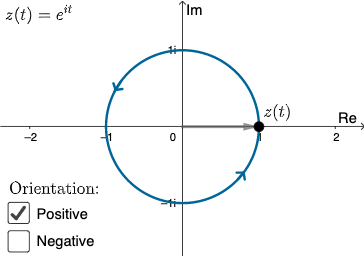
① This example demonstrates the orientation of a point moving along a circle (clockwise or counterclockwise) and related geometric elements such as tangents, radii, and intersections, helping learners understand the concept of circle orientation. ② Core mathematical concepts include parametric equations of a circle, vector direction, point trajectories, and the Pythagorean theorem applied to circles and right triangles, along with geometric transformations like dilation and intersection. ③ Construction highlights: using GeoGebra commands such as If, CurveCartesian, Vector, Point, and Segment, the construction builds a circle, lines, intersection points, text labels, and a play button, with sliders controlling speed and direction for dynamic animation. ④ Suitable for middle or high school geometry and analytic geometry classes, this example serves as an interactive teaching tool for circle orientation, parametric equations, and dynamic geometric constructions, and can be a reference for teachers creating interactive lessons.
GeoGebra Commands & Parameters
If(b ≟ 1, 1, -1) → cCurveCartesian(cos(k), (c * sin(k)), k, 0, (2 * π)) → aVector((0, 0), G) → v3Point(a) → APoint(a) → BSegment(A, B) → fPoint(a) → CPoint(a) → DSegment(C, D) → gPoint(a) → EPoint(a) → FSegment(E, F) → hPoint(a) → HPoint(a) → ISegment(H, I) → i
AI Drawing Prompt Reference
Draw a circle and let a point move along the circumference at a variable speed and direction. Draw tangents, radii, diameter, and chords on the circle. Use sliders to control the point's speed and direction, and show the point's trajectory.
The prompt above was compiled from the original drawing commands and is for reference only.