
Perpendicular Bisectors and Circumcenter
Loading the math board and drawing, please wait…
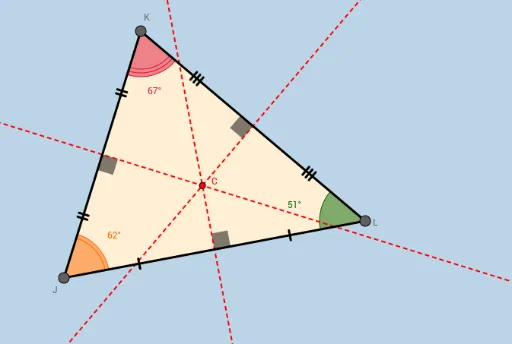
This applet demonstrates the circumcenter and circumcircle of a triangle by drawing perpendicular bisectors. Students can discover the properties of the circumcenter. Key mathematical concepts include the circumcenter, circumcircle, and perpendicular bisectors. GeoGebra commands used include Segment, LineBisector, Angle, Intersect, and Polygon. Suitable for middle school and above students learning geometric construction.
GeoGebra Commands & Parameters
Segment(J, L) → aSegment(L, K) → bSegment(K, J) → cLineBisector(a) → gLineBisector(c) → hLineBisector(b) → iAngle(a, g) → αAngle(b, i) → βAngle(c, h) → γIntersect(g, a) → DIntersect(i, b) → EIntersect(h, c) → FSegment(J, D) → dSegment(D, L) → eSegment(L, E) → fSegment(E, K) → jSegment(K, F) → kSegment(F, J) → lIntersect(g, h) → CAngle(D, J, F) → δAngle(F, K, E) → εAngle(E, L, D) → ζPolygon(J, K, L) → poly1, l_1, j_1, k_1
AI Drawing Prompt Reference
Draw a triangle and construct the perpendicular bisector for each of its three sides. These three bisectors intersect at a single point, the circumcenter. Using this point as the center, draw a circle that passes through all three vertices of the triangle. On each side, mark the midpoint where the perpendicular bisector meets the side, dividing the side into two equal segments. Label the three interior angles of the triangle and the right angles formed between each bisector and its side. Finally, connect the circumcenter to each vertex with dashed lines, and indicate the distances from the circumcenter to the vertices and to the side midpoints.
The prompt above was compiled from the original drawing commands and is for reference only.