
Perpendicular Bisector Construction: Geometric Analysis
Loading the math board and drawing, please wait…
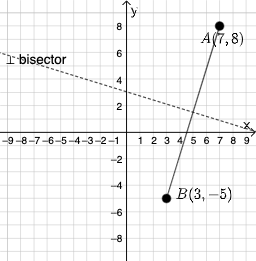
This example demonstrates constructing a perpendicular bisector using GeoGebra and analyzing its geometric properties. Key mathematical concepts include linear equations, coordinate geometry, and symmetry. Construction involves commands like PointIn, Segment, LineBisector, and dynamic input boxes. Suitable for middle school or high school students for geometry practice and coordinate system applications.
GeoGebra Commands & Parameters
PointIn(e) → APointIn(e) → BSegment(A, B) → fLineBisector(f) → gTextfield(h) → InputBox1Textfield(i) → InputBox2Textfield(j) → InputBox3If(p ≟ g, "√", "X") → text3Mode(l1) → l2If(Length[l2] ≟ 0, "No digits repeat!", "You have repeated digits.") → text4
AI Drawing Prompt Reference
Draw a line segment AB and its perpendicular bisector. The bisector should pass through the midpoint of AB and be perpendicular to AB. Ensure the diagram is clear and labels key points like the midpoint.
The prompt above was compiled from the original drawing commands and is for reference only.