
Perigal's Dissection
Loading the math board and drawing, please wait…
In collections
GCSE Higher Ch5 Angles & Trigonometry
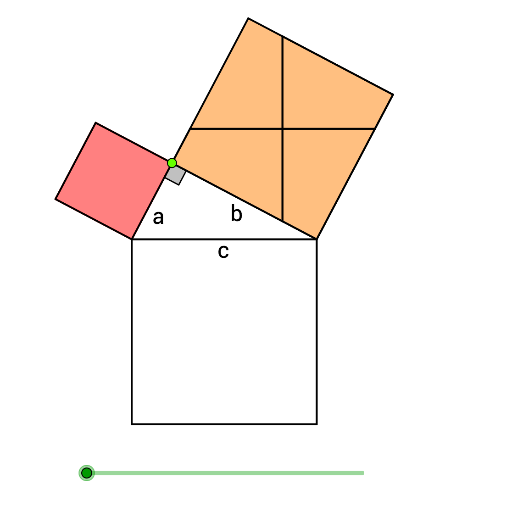
This example demonstrates Perigal's Dissection, a geometric puzzle where two semicircles are dissected into pieces that can be rearranged to form a square. It involves coordinate geometry, subtraction, geometric construction, and special points. Key GeoGebra commands and objects used include Point, Semicircle, Polygon, Angle, Midpoint, Line, OrthogonalLine, Intersect, If, and Translate. Suitable for high school and above, exploring geometric transformations and optimization problems.
GeoGebra Commands & Parameters
Point(xAxis) → APoint(xAxis) → BSemicircle(A, B) → cPoint(c) → CPolygon(A, C, 4) → poly1, a, b, d, e, D, EPolygon(C, B, 4) → poly2, f, g, h, i, F, GPolygon(B, A, 4) → poly3, j, k, l, m, H, IAngle(A, C, B) → αMidpoint(C, F) → JMidpoint(C, E) → KLine(J, j) → nLine(K, j) → pOrthogonalLine(J, j) → qOrthogonalLine(K, j) → rIntersect(n, i) → LIntersect(q, f) → MIntersect(n, g) → NIntersect(q, h) → OIntersect(r, d) → PIntersect(p, e) → QIntersect(p, b) → RIntersect(r, a) → SPolygon(O, G, L, J) → poly4, o, g_1, l_1, j_1Polygon(L, C, M, J) → poly5, l_2, c_1, m_1, j_2Polygon(O, J, N, F) → poly6, o_1, j_3, n_1, f_1Polygon(J, M, B, N) → poly7, j_4, m_2, b_1, n_2Polygon(P, K, Q, E) → poly8, p_1, k_1, q_1, e_1Polygon(Q, A, S, K) → poly9, q_2, a_1, s, k_2Polygon(K, S, C, R) → poly10, k_3, s_1, c_2, r_1Polygon(K, P, D, R) → poly11, k_4, p_2, d_1, r_2Midpoint(H, B) → TIf(t ≤ 1, t, 1) → t1If(t ≤ 1, 0, If[t ≤ 2, t - 1, 1]) → t2If(t ≤ 2, 0, If[t ≤ 3, t - 2, 1]) → t3If(t ≤ 3, 0, If[t ≤ 4, t - 3, 1]) → t4If(t ≤ 4, 0, If[t ≤ 5, t - 4, 1]) → t5Translate(Element[list1, 5], Vector[(t5 * Vector[K, T])]) → list1eTranslate(Element[list1, 1], Vector[(t1 * Vector[J, I])]) → list1aTranslate(Element[list1, 2], Vector[(t2 * Vector[J, B])]) → list1bTranslate(Element[list1, 4], Vector[(t3 * Vector[J, A])]) → list1dTranslate(Element[list1, 3], Vector[(t4 * Vector[J, H])]) → list1cTranslate(Element[list2, 1], Vector[(t1 * Vector[K, I])]) → list2aTranslate(Element[list2, 2], Vector[(t2 * Vector[K, B])]) → list2bTranslate(Element[list2, 3], Vector[(t3 * Vector[K, A])]) → list2cTranslate(Element[list2, 4], Vector[(t4 * Vector[K, H])]) → list2dTranslate(Element[list2, 5], Vector[(t5 * Vector[J, T])]) → list2e
AI Drawing Prompt Reference
Draw a figure composed of two semicircles that can be dissected and rearranged to form a square. Start by creating points A and B on the x-axis, then draw two semicircles with A and B as their diameters. Next, create four vertices on each semicircle to form three quadrilaterals. Find key angles and midpoints, then draw several lines and perpendiculars using these points. Finally, rearrange the quadrilaterals through translation to form a square.
The prompt above was compiled from the original drawing commands and is for reference only.