
Quarter the Cross: 4 Dot Challenge
Loading the math board and drawing, please wait…
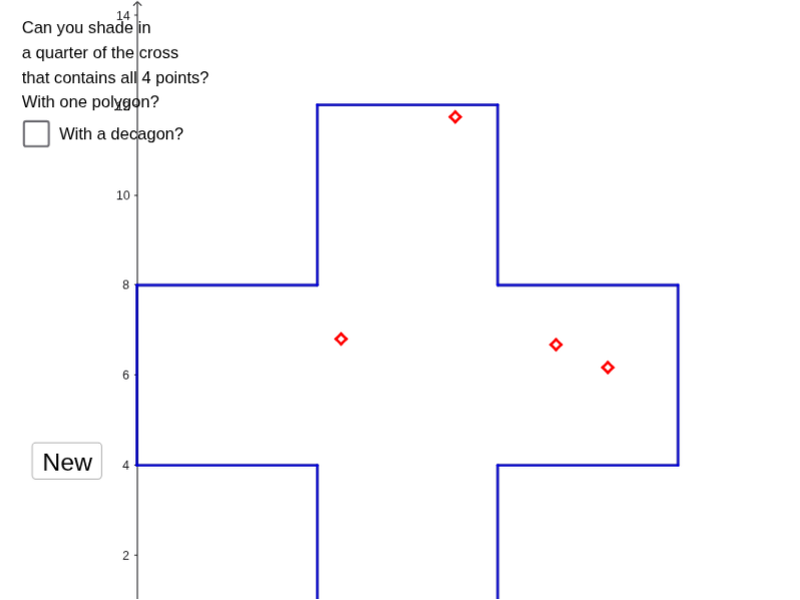
This example demonstrates how to construct a quarter cross shape using four points. It involves core mathematical concepts such as area, fractions, linear regression, polynomial functions, kites, percentages, and arithmetic. The construction utilizes GeoGebra commands/objects like Polygon, RandomPointIn, and PointIn. Suitable for high school students exploring geometric constructions and data analysis.
GeoGebra Commands & Parameters
Polygon((4, 0), (8, 0), (0, 4), (4, 4), (8, 4), (12, 4), (12, 8), (8, 8), (8, 12), (4, 12), (4, 8), (0, 8)) → poly1, f, p, q, r, g, h, i, j, k, l, m, nRandomPointIn(poly1) → ARandomPointIn(poly1) → BRandomPointIn(poly1) → CRandomPointIn(poly1) → DPolygon(E, F, O, P, G, H, I, J, K, L, M, N) → poly2, s, i_1, j_1, k_1, t, b, c, d, e, f_1, g_1, h_1PointIn(poly2) → Pointpoly2
AI Drawing Prompt Reference
Draw a cross-shaped outline composed of multiple squares, forming a symmetric cross with four arms. Place four random points inside the cross shape at distinct locations. Then connect these four points with a closed polyline to form a quadrilateral, and place one additional random point inside that quadrilateral. The figure should clearly show the cross boundary, the four points, the connecting quadrilateral, and the inner point, illustrating geometric construction and random distribution.
The prompt above was compiled from the original drawing commands and is for reference only.