
Fixed Perimeter Area Quadratics
Loading the math board and drawing, please wait…
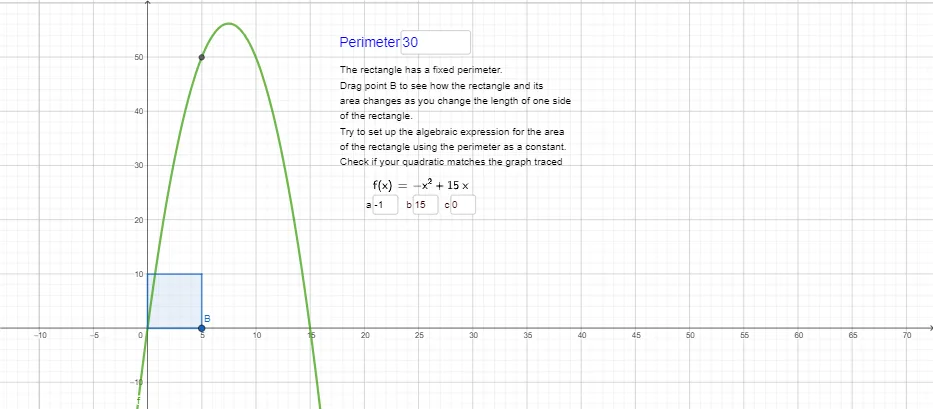
This example demonstrates the variation of area in different triangles under a fixed perimeter, illustrating key mathematical concepts such as perimeter, area, quadratic functions, median value, and numerical calculations. It is constructed using GeoGebra commands like Intersect, Point, Textfield, Segment, Polygon, and LaTeX, with objects including A, B, P, InputBox1, l, h, D, C, Area, g, i, j, d, Size, text1, a, b, c, InputBox2, InputBox3, InputBox4, f, and text2. Suitable for high school mathematics education, it helps students understand the relationship between functions and geometric shapes, as well as optimization problems.
GeoGebra Commands & Parameters
Intersect(xAxis, yAxis) → APoint(xAxis) → BTextfield(P) → InputBox1Segment(A, B) → lPolygon(A, B, C, D) → Area, g, i, j, dTextfield(a) → InputBox2Textfield(b) → InputBox3Textfield(c) → InputBox4LaTeX(f, true, true) → text2
AI Drawing Prompt Reference
Draw a quadrilateral with fixed perimeter to show the variation of area in different triangles, using points A, B, C, and D where A and B are on the x-axis and C and D are on the y-axis, forming a quadrilateral representing the area. InputBox1 is for entering the perimeter, while InputBox2, InputBox3, and InputBox4 are for entering the lengths of the three sides of the triangle, which affect the shape of the quadrilateral and thus the area.
The prompt above was compiled from the original drawing commands and is for reference only.