
Pentagon Rotation Puzzle
Loading the math board and drawing, please wait…
In collections
Transformation Puzzles
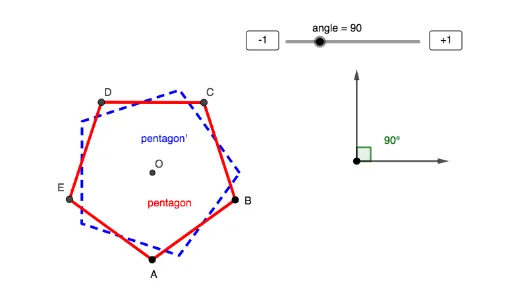
This example demonstrates the rotation of a pentagon around a point. Key mathematical concepts include rotation, geometric transformations, and coordinates. Using GeoGebra commands such as Circle, Angle, Polygon, Vector, etc., the dynamic rotation effect of the pentagon can be observed. Suitable for middle school and above students or teachers for geometry education.
GeoGebra Commands & Parameters
Circle(G, 2) → cAngle(I, G, F) → angle_1Polygon(A, B, 5) → pentagon, f, g, h, i, j, C, D, EVector(G, F) → uVector(G, I) → vCircle(D, C, B) → dTangent(B, d) → k,OrthogonalLine(B, k) → lTangent(C, d) → m,OrthogonalLine(C, m) → nIntersect(l, n) → ORotate(pentagon, (angle / 180 * π), O) → pentagon'
AI Drawing Prompt Reference
Draw a regular pentagon and rotate it around a vertex by a dynamic angle. Start with a circle centered at the rotation center with a fixed radius. Place two points on the circle and connect them to the center with vectors to define the rotation angle. Construct an auxiliary circle using one side of the pentagon as a diameter, then draw tangents from two adjacent vertices of the pentagon to this auxiliary circle, and construct perpendicular lines to these tangents at the vertices. The intersection of these two perpendicular lines serves as the pivot point. Finally, rotate the entire pentagon around this pivot by the given angle, showing both the original and rotated pentagons to illustrate the transformation.
The prompt above was compiled from the original drawing commands and is for reference only.