
Hexagon Rotation Transformation
Loading the math board and drawing, please wait…
In collections
Transformation Puzzles
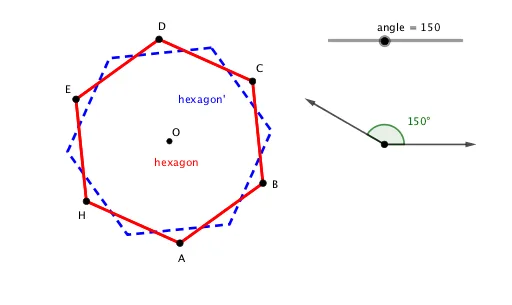
This example demonstrates how to rotate a hexagon around a specified center point by any angle. The core mathematical concepts include rotation congruence, geometric transformations, and the relationship between vectors and angles. The hexagon is created using the Polygon command, rotation is achieved through the Rotate command combined with Angle objects, and the Vector command helps understand the vector characteristics of rotation. Users can interactively adjust the rotation angle to observe the congruence transformation effect. Suitable for middle school 'Geometry' unit teaching, or for demonstrating fundamental properties of geometric transformations to help students understand that rotation preserves the size and shape of figures (congruence).
GeoGebra Commands & Parameters
Circle(G, 2) → cAngle(I, G, F) → angle_1Polygon(A, B, 6) → hexagon, f, H, g, h, i, j, l, C, D, ELine(C, H) → mLine(D, A) → kIntersect(k, m) → OVector(G, F) → uRotate(hexagon, angle_1, O) → hexagon'Vector(G, I) → v
AI Drawing Prompt Reference
Create a plane figure with a given center point G and a circle centered at G (use radius 2). Choose points F and I on the setup so that an angle at G between rays toward I and F is defined. Construct a hexagon (regular-like arrangement) using the appropriate points A and B on/with the circle. Draw the lines through C–H and D–A and take their intersection as the rotation center O. Form the angle at G (between I and F) as angle_1. Rotate the constructed hexagon about O by the angle angle_1 to obtain the rotated hexagon, and include vectors from G to F and from G to I to help indicate the rotation direction and angle.
The prompt above was compiled from the original drawing commands and is for reference only.