
Pentagon Construction
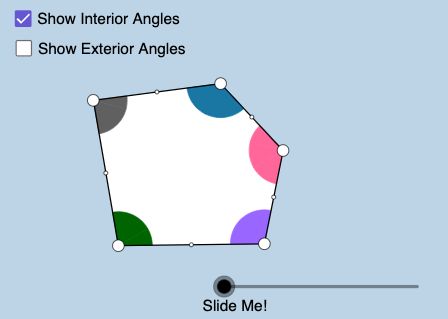
Loading the math board and drawing, please wait…
In collections
Polygon Angles: Interactive Exploration
This example demonstrates the construction of a pentagon. Key mathematical concepts include polygons and angles. Using GeoGebra commands such as Segment, Circle, Intersect, and Rotate, a pentagon can be constructed. Suitable for middle school and above students to learn about polygon properties and geometric construction.
GeoGebra Commands & Parameters
Segment(D, E) → i_3Midpoint(i_3) → M_3Ray(A, B) → aRay(B, C) → bRay(C, D) → cRay(D, E) → dRay(E, A) → eCircle(A, 1.5) → fCircle(B, 1.5) → gCircle(C, 1.5) → hCircle(D, 1.5) → kCircle(E, 1.5) → pSegment(C, A) → iSegment(C, E) → jIntersect(f, a, 1) → FIntersect(f, i, 1) → GIntersect(f, e, 1) → HIntersect(f, e, 2) → IIntersect(p, e) → J,Intersect(p, j) → K,Intersect(p, d, 1) → LIntersect(p, d, 2) → MIntersect(k, d, 1) → NIntersect(k, c, 2) → OIntersect(h, c, 1) → PIntersect(h, j, 1) → QIntersect(h, i, 1) → RIntersect(h, b, 1) → SIntersect(g, a, 2) → TIntersect(g, b, 1) → UIntersect(g, a, 1) → VCircleSector(A, F, G) → qCircleSector(A, G, H) → rCircleSector(B, U, V) → sCircleSector(C, P, Q) → tCircleSector(C, Q, R) → c_1CircleSector(C, R, S) → d_1Intersect(k, c, 1) → WCircleSector(D, O, N) → e_1CircleSector(D, N, W) → f_1CircleSector(E, M, J) → g_1CircleSector(E, J, K) → h_1CircleSector(E, K, L) → k_1CircleSector(A, I, F) → p_1CircleSector(B, T, U) → q_1Intersect(h, b, 2) → ZCircleSector(C, Z, P) → r_1Vector(A, B) → uVector(C, B) → vVector(E, D) → wVector(C, D) → u_1Vector(C, E) → v_1Vector(A, E) → w_1Translate(d_1, v) → s_1Mirror(s_1, B) → t_1Dilate(A, If[0 < l ≤ 1, 1 - l, 0], B) → A'Dilate(C, If[0 < l ≤ 1, 1 - l, 0], B) → C'Dilate(A, If[1 < l ≤ 2, 2 - l, 0], E) → A'_1Dilate(C, If[1 < l ≤ 2, 2 - l, 0], E) → C'_1Dilate(C, If[2 < l ≤ 3, 3 - l, 0], D) → C'_2Vector(A, B) → a_1Vector(C, C') → b_1Vector(A, A'_1) → i_1Rotate(E, If[2 < l ≤ 3, ((-(l - 2)) * 180°), -180°], M_3) → E'Vector(E, E') → j_1Vector(C, C'_2) → l_1Vector(C, C'_1) → m_1Translate(d_1, b_1) → c_2Translate(r, i_1) → r'_1Translate(r, w_1) → r'_2Translate(k_1, w) → d_2Translate(k_1, j_1) → e_2Translate(c_1, v_1) → f_2Translate(c_1, m_1) → g_2Translate(t, u_1) → t'Translate(t, l_1) → t'_1Translate(q, a_1) → r'Translate(d_1, b_1) → h_2Vector(A, A') → n_1Line(E, C) → a_2Line(E, D) → b_2Segment(E, C) → i_2Vector(D, C) → u_2Vector(E, C) → v_2Vector(A, C) → w_2Vector(B, C) → l_2Dilate(B, If[0 < o < 1, 1 - o, 0], C) → B'Dilate(A, If[1 < o < 2, 2 - o, 0], C) → A'_2Dilate(E, If[2 < o < 3, 3 - o, 0], C) → E'_1Dilate(D, If[3 < o < 4, 4 - o, 0], C) → D'Vector(B, B') → m_2Vector(A, A'_2) → n_2Vector(E, E'_1) → s_2Vector(D, D') → t_2Translate(q_1, m_2) → c_3Translate(q_1, l_2) → d_3Translate(p_1, w_2) → e_3Translate(g_1, v_2) → f_3Translate(e_1, u_2) → g_3If(1 < o < 2, Translate[p_1, n_2]) → h_3If(2 < o < 3, Translate[g_1, s_2]) → k_3If(3 < o < 4, Translate[e_1, t_2]) → p_3Point(a_2) → A_1Point(a_2) → B_1Ray(C, B_1) → a_3Ray(E, A_1) → b_3Polygon(A, B, C, D, E) → poly1, a_4, b_4, c_4, d_4, e_4Polygon(A, B, C) → poly2, c_5, a_5, b_5Polygon(A, C, E) → poly3, e_5, a_6, c_6Polygon(E, C, D) → poly4, d_5, e_6, c_7Segment(E, A) → j_3Segment(A, B) → l_3Segment(B, C) → m_3Segment(C, D) → n_3Midpoint(j_3) → M_4Midpoint(l_3) → M_5Midpoint(m_3) → M_1Midpoint(n_3) → M_2Rotate(d_1, If[0 < l ≤ 1, ((-l) * 180°), -180°], M_1) → k_2Rotate(C, If[0 < l ≤ 1, ((-l) * 180°), -180°], M_1) → C'_3Segment(M_1, C'_3) → q_3Rotate(q, If[0 < l ≤ 1, (l * 180°), 180°], M_5) → q'Rotate(A, If[0 < l ≤ 1, (l * 180°), 180°], M_5) → A'_3Rotate(R, 180°, M_1) → R'Line(B, R') → s_3Segment(M_5, A'_3) → r_3Rotate(r, If[1 < l ≤ 2, ((-(l - 1)) * 180°), -180°], M_4) → r'_3Rotate(A, If[1 < l ≤ 2, ((-(l - 1)) * 180°), -180°], M_4) → A'_4Segment(M_4, A'_4) → p_2Rotate(t, If[2 < l ≤ 3, ((l - 2) * 180°), 180°], M_2) → t'_2Rotate(C, If[2 < l ≤ 3, ((l - 2) * 180°), 180°], M_2) → C'_4Segment(M_2, C'_4) → q_2Vector(E, D) → j_2Translate(L, j_2) → L'Ray(D, L') → r_2CircleArc(C, R, S) → t_3CircleArc(C, Q, R) → f_4CircleArc(C, P, Q) → g_4CircleArc(A, F, G) → h_4CircleArc(A, G, H) → k_4CircleArc(E, K, L) → p_4Segment(M_3, E') → i_4
AI Drawing Prompt Reference
Draw a regular pentagon. The shape consists of five equilateral triangles sharing a common vertex. The circumradius is 1.5, and the center is at the pentagon's center. The construction order starts from the center, then draws the five triangles, and finally connects the vertices to form the pentagon. Ensure the shape is symmetric and clear.
The prompt above was compiled from the original drawing commands and is for reference only.