
Pascal Triangle Row Sum Pattern
Loading the math board and drawing, please wait…
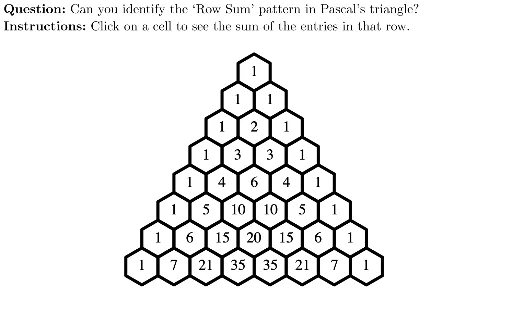
This example demonstrates the row sum pattern in Pascal's Triangle. Key mathematical concepts include sequences and combinatorics. Using GeoGebra commands such as Sequence, Vector, and Text, the generation process of Pascal's Triangle and its row sums are dynamically displayed. Suitable for high school freshmen to learn about sequences and combinatorics.
GeoGebra Commands & Parameters
UnicodeToLetter(10007) → xmarkUnicodeToLetter(10003) → cmarkPolygon(BLviewbox, (x(BLviewbox), y(TRviewbox)), TRviewbox, (x(TRviewbox), y(BLviewbox))) → viewbox, vb1, vb4, vb2, vb3Polygon(A, B, 6) → hexagon1, Aside_2, F, Aside_1, Aside_3, Aside_4, Aside_5, Aside_6, C, D, EVector(A, E) → vVector(F, B) → uMidpoint(F, C) → CenterSequence(Polygon[A + (A2 * u) + (i * v), B + (A2 * u) + (i * v), 6], i, 0, A2) → B2Sequence(Polygon[A + (A3 * u) + (i * v), B + (A3 * u) + (i * v), 6], i, 0, A3) → B3Sequence(Polygon[A + (A4 * u) + (i * v), B + (A4 * u) + (i * v), 6], i, 0, A4) → B4Sequence(Polygon[A + (A5 * u) + (i * v), B + (A5 * u) + (i * v), 6], i, 0, A5) → B5Sequence(Polygon[A + (A6 * u) + (i * v), B + (A6 * u) + (i * v), 6], i, 0, A6) → B6Sequence(Polygon[A + (A7 * u) + (i * v), B + (A7 * u) + (i * v), 6], i, 0, A7) → B7Sequence(Polygon[A + (A8 * u) + (i * v), B + (A8 * u) + (i * v), 6], i, 0, A8) → B8Sequence(Polygon[A + (A9 * u) + (i * v), B + (A9 * u) + (i * v), 6], i, 0, A9) → B9Sequence(nCr[A2, i], i, 0, A2) → D2Sequence(nCr[A3, i], i, 0, A3) → D3Sequence(nCr[A4, i], i, 0, A4) → D4Sequence(nCr[A5, i], i, 0, A5) → D5Sequence(nCr[A6, i], i, 0, A6) → D6Sequence(nCr[A7, i], i, 0, A7) → D7Sequence(nCr[A8, i], i, 0, A8) → D8Sequence(nCr[A9, i], i, 0, A9) → D9If(C2, ((("Row " * A2) * ": sum = ") * Sum[D2]), "") → F2If(C3, ((("Row " * A3) * ": sum = ") * Sum[D3]), "") → F3If(C4, ((("Row " * A4) * ": sum = ") * Sum[D4]), "") → F4If(C5, ((("Row " * A5) * ": sum = ") * Sum[D5]), "") → F5If(C6, ((("Row " * A6) * ": sum = ") * Sum[D6]), "") → F6If(C7, ((("Row " * A7) * ": sum = ") * Sum[D7]), "") → F7If(C8, ((("Row " * A8) * ": sum = ") * Sum[D8]), "") → F8If(C9, ((("Row " * A9) * ": sum = ") * Sum[D9]), "") → F9Sequence(Sequence[Polygon[A + (k * u) + (j * v), B + (k * u) + (j * v), 6], j, 0, k], k, 0, 7) → pascalOutlineText(F2, Center + ((A2 + 0.05) * u) + (Length[B2] * v)) → G2Text(F3, Center + ((A3 + 0.0500000000000002) * u) + (Length[B3] * v)) → G3Text(F4, Center + ((A4 + 0.0500000000000002) * u) + (Length[B4] * v)) → G4Text(F5, Center + ((A5 + 0.0500000000000002) * u) + (Length[B5] * v)) → G5Text(F6, Center + ((A6 + 0.0500000000000002) * u) + (Length[B6] * v)) → G6Text(F7, Center + ((A7 + 0.0500000000000002) * u) + (Length[B7] * v)) → G7Text(F8, Center + ((A8 + 0.0500000000000002) * u) + (Length[B8] * v)) → G8Text(F9, Center + ((A9 + 0.0500000000000002) * u) + (Length[B9] * v)) → G9Sequence(Text[Element[D2, i + 1], Center + (A2 * u) + (i * v) - (0.2 + ((Length[Text[Element[D2, i + 1]]] - 1) * 0.2), 0.2)], i, 0, Length[D2] - 1) → E2Sequence(Text[Element[D3, i + 1], Center + (A3 * u) + (i * v) - (0.2 + ((Length[Text[Element[D3, i + 1]]] - 1) * 0.2), 0.2)], i, 0, Length[D3] - 1) → E3Sequence(Text[Element[D4, i + 1], Center + (A4 * u) + (i * v) - (0.2 + ((Length[Text[Element[D4, i + 1]]] - 1) * 0.2), 0.2)], i, 0, Length[D4] - 1) → E4Sequence(Text[Element[D5, i + 1], Center + (A5 * u) + (i * v) - (0.2 + ((Length[Text[Element[D5, i + 1]]] - 1) * 0.2), 0.2)], i, 0, Length[D5] - 1) → E5Sequence(Text[Element[D6, i + 1], Center + (A6 * u) + (i * v) - (0.2 + ((Length[Text[Element[D6, i + 1]]] - 1) * 0.2), 0.2)], i, 0, Length[D6] - 1) → E6Sequence(Text[Element[D7, i + 1], Center + (A7 * u) + (i * v) - (0.2 + ((Length[Text[Element[D7, i + 1]]] - 1) * 0.2), 0.2)], i, 0, Length[D7] - 1) → E7Sequence(Text[Element[D8, i + 1], Center + (A8 * u) + (i * v) - (0.2 + ((Length[Text[Element[D8, i + 1]]] - 1) * 0.2), 0.2)], i, 0, Length[D8] - 1) → E8Sequence(Text[Element[D9, i + 1], Center + (A9 * u) + (i * v) - (0.2 + ((Length[Text[Element[D9, i + 1]]] - 1) * 0.2), 0.2)], i, 0, Length[D9] - 1) → E9Sequence((("SetValue(C" * i) * ",false)"), i, 2, 9) → cmdTurnOffAllLaTeX((((("\text{\textbf{Question: }" * MainInstruc) * "\\\textbf{Instructions: }") * SpecInstruc) * "}")) → allInstruc
AI Drawing Prompt Reference
Draw the row and row sum pattern of Pascal's Triangle. Start by drawing a hexagon, then use vectors and midpoints to generate multiple hexagons, forming the outline of Pascal's Triangle. Next, calculate the binomial coefficients for each hexagon and display them inside each hexagon. Finally, show the sum of the row numbers for each hexagon.
The prompt above was compiled from the original drawing commands and is for reference only.