
Partial Derivatives Demonstration
Loading the math board and drawing, please wait…
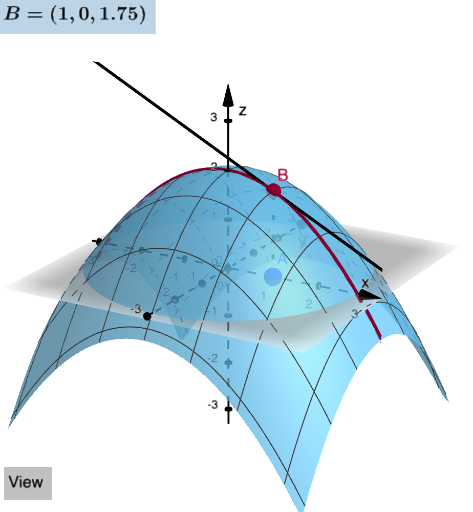
This example demonstrates the concept of partial derivatives. It uses various GeoGebra commands such as Segment, Textfield, Derivative, etc., to construct a dynamic partial derivative graph. Suitable for students and teachers in calculus courses.
GeoGebra Commands & Parameters
Segment(A, B) → gTextfield(f) → InputBox1Derivative(f, x) → fxDerivative(f, y) → fyCurveCartesian(x(A), s, f(x(A), s), s, -10, 10) → cyCurveCartesian(s, y(A), f(s, y(A)), s, -10, 10) → cxCurveCartesian(x(A) + s, y(A), f(x(A), y(A)) + (s * fx(x(A), y(A))), s, -10, 10) → txCurveCartesian(x(A), y(A) + s, f(x(A), y(A)) + (s * fy(x(A), y(A))), s, -10, 10) → tyTextfield(Ax) → InputBox2Textfield(Ay) → InputBox3Function(f(x(A), y(A)) + (fx(x(A), y(A)) * (x - x(A))) + (fy(x(A), y(A)) * (y - y(A))), x(A) - 1, x(A) + 1, y(A) - 1, y(A) + 1) → TangPPoint(zAxis) → DIntersect(zAxis, yAxis) → EVector(D, E) → uPoint(xAxis) → FVector(F, E) → vPoint(yAxis) → GIntersect(yAxis, zAxis) → HVector(G, H) → wElement(list1, faces) → Selectedvector
AI Drawing Prompt Reference
Draw a graph showing the partial derivatives of a function, including the function surface, x, y, and z axes, and the tangent plane and line at point A. First, draw the x and y axes, then plot the surface based on the function expression. Next, select a point A on the surface and draw the partial derivative tangent line and plane at point A. Finally, draw the z axis and select a point D on the z axis, with intersection point E on the y axis, and points F and G on the x and y axes respectively, to draw vectors u, v, and w.
The prompt above was compiled from the original drawing commands and is for reference only.