
Trapezoid Area Calculation by Steve Phelps
Loading the math board and drawing, please wait…
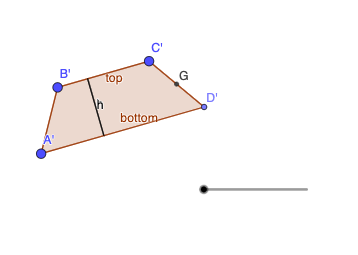
This example demonstrates the calculation of a trapezoid's area. It involves core mathematical concepts such as area formulas, Pythagorean theorem, unit circle, derivatives, natural numbers, and inequalities. The construction uses GeoGebra commands/objects like Segment, Line, Point, Polygon, OrthogonalLine, Intersect, Midpoint, and Rotate. Suitable for high school students learning geometry and calculus.
GeoGebra Commands & Parameters
Segment(B, C) → fLine(A, f) → gPoint(g) → DPolygon(A, B, C, D) → q1, a, b, c, dPoint(d) → EOrthogonalLine(E, b) → hIntersect(h, b) → FSegment(E, F) → iMidpoint(c) → GRotate(A, (-((180° * e))), G) → A'Rotate(B, (-((180° * e))), G) → B'Rotate(C, (-((180° * e))), G) → C'Rotate(D, (-((180° * e))), G) → D'Polygon(A', B', C', D') → q1', a', b', c', d'Rotate(E, (-((180° * e))), G) → E'Rotate(F, (-((180° * e))), G) → F'Segment(E', F') → i'
AI Drawing Prompt Reference
Construct a trapezoid in the plane using four given points A, B, C, and D and draw the polygonal outline connecting them. From point D, draw a line through the relevant reference point E that is perpendicular to the chosen direction line, then find its intersection with that direction line to obtain F, and draw the segment EF as an auxiliary side. Take the midpoint G of the specified segment related to C. Using G as the rotation center, rotate A, B, C, and D by a half-turn (180° scaled by a parameter e) to get A', B', C', and D'. Also rotate E and F around G to obtain E' and F', and finally draw the segment E'F' to complete the rotated auxiliary structure.
The prompt above was compiled from the original drawing commands and is for reference only.