
Parent Sine and Cosine Functions
Loading the math board and drawing, please wait…
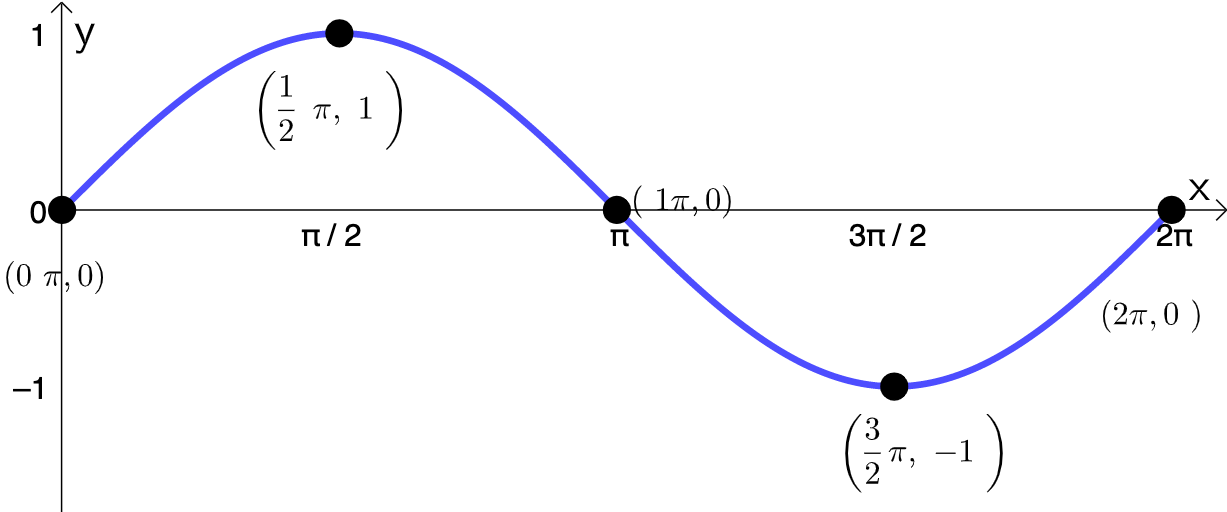
This example demonstrates the graphs and properties of sine and cosine functions. Sine and cosine are fundamental trigonometric functions showing periodicity, symmetry, and phase relationships. Construction involves using GeoGebra's FitSin command to draw function graphs, Textfield and Point objects for annotations, and SurdText for precise values. Suitable for high school students learning trigonometric basics or for math teaching demonstrations.
GeoGebra Commands & Parameters
Textfield(start) → InputBox1Textfield(end) → InputBox2Textfield(k1) → InputBox3Textfield(k2) → InputBox4Textfield(k3) → InputBox5Point(eq6) → APoint(eq7) → BPoint(eq8) → CPoint(eq9) → DTextfield(a) → InputBox6Textfield(b) → InputBox7Point(eq10) → EPoint(eq7) → FFitSin({A, C, D, E, F}) → fSurdText(k2 / π) → text1SurdText(x(A) / π) → text4SurdText(k1 / π) → text6SurdText(x(E) / π) → text8SurdText(x(F) / π) → text10
AI Drawing Prompt Reference
Plot a sine function graph on a coordinate system. First create five input boxes for setting parameters start, end, k1, k2, and k3. Then mark six control points on the function curve, labeled A, B, C, D, E, and F. Use five of these points (A, C, D, E, F) to fit and generate a sine curve f. Finally, display three text labels showing the parameter values of k1 and k2 in rational form with π as the unit, as well as the ratios of the x-coordinates of points A, E, and F to π.
The prompt above was compiled from the original drawing commands and is for reference only.