
Parametrization of Curves in the Complex Plane
Loading the math board and drawing, please wait…
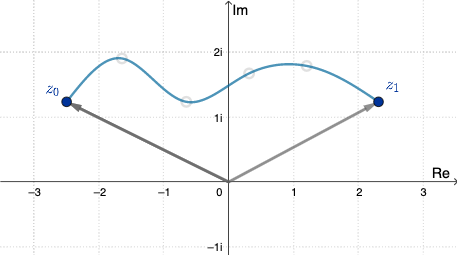
This example demonstrates the parametrization of curves in the complex plane. Key mathematical concepts include complex numbers and parametric equations. Using GeoGebra commands such as Spline and Vector, complex curves can be constructed. Suitable for high school mathematics education and students learning about parametric equations.
GeoGebra Commands & Parameters
Spline(L_1, 3) → aVector((0, 0), A) → v1Vector((0, 0), F) → v2Vector((0, 0), G) → v3
AI Drawing Prompt Reference
Draw a smooth parametric curve in the complex plane generated from several points, and add three vectors starting from the origin, each pointing to a distinct key point on the curve. The curve should appear as a continuous path, illustrating complex parametrization. The vectors should be distinguished by color or style, all sharing the origin as their start, with endpoints on different parts of the curve to show how complex numbers move as the parameter changes. The overall layout should clearly display the geometric relationship between the curve and the vectors, suitable for high school students learning about parametric equations and complex geometry.
The prompt above was compiled from the original drawing commands and is for reference only.