
Parametric Circle Visualization in the Complex Plane
Loading the math board and drawing, please wait…
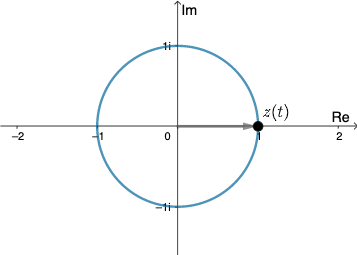
This example demonstrates the parametric representation and dynamic visualization of a circle in the complex plane (Gaussian plane). Using GeoGebra's CurveCartesian command with parameter t, the unit circle is drawn in complex form z=a·e^(it), showing the geometric correspondence between complex numbers and trigonometric functions. Construction details: The Vector command creates vectors from the origin to points on the circle, dynamically displaying the vector endpoints corresponding to complex numbers; slider parameter t combined with the play button creates cyclic motion of points on the circle; variable a controls the circle's radius. This example is suitable for high school mathematics 'Complex Numbers' unit teaching, helping students understand the relationship between algebraic and geometric representations of complex numbers, and can also serve as an introductory example for curve plotting in university 'Complex Analysis' courses.
GeoGebra Commands & Parameters
CurveCartesian(cos(k), sin(k), k, 0, (2 * π)) → aVector((0, 0), G) → v3
AI Drawing Prompt Reference
Draw a unit circle in the complex plane. Points on the circle are connected by vectors from the origin. The parameter t controls the position of points, and a slider allows cyclic motion. The variable a controls the radius. This illustrates the geometric correspondence between complex numbers and trigonometric functions, helping to understand the connection between algebraic and geometric representations.
The prompt above was compiled from the original drawing commands and is for reference only.