
Parameterized Regular Prism Construction with Surface Area and Volume
Loading the math board and drawing, please wait…
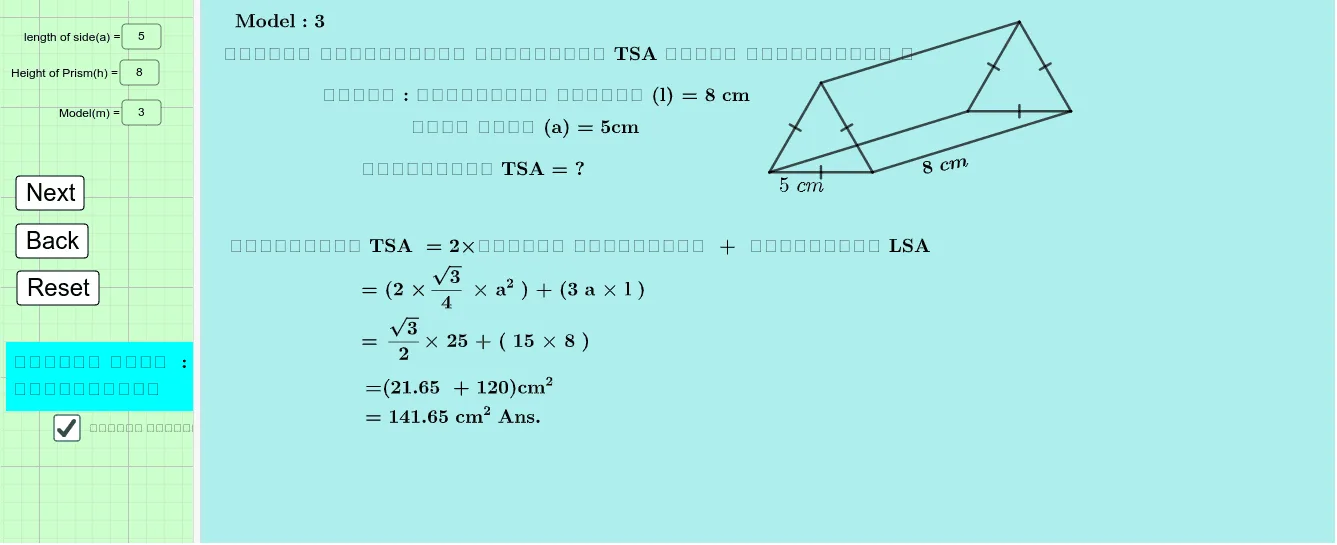
This example demonstrates how to build a (regular/equilateral) prism in GeoGebra and visualize key quantities such as volume and surface area while varying parameters. It focuses on solid-geometry construction: forming a base polygon from evenly spaced points on a circle, generating the top face via rotation, and assembling the prism’s lateral faces. The main concepts include prism structure, relationships between base edges and lateral edges, and the geometric meaning behind total surface area (e.g., TSA/LSA) and volume (Volume). Construction approach in GeoGebra: Textfield with InputBox parameters (e.g., number of sides n, height-related variables), Point and Segment for defining key vertices and edges, Circle as a reference for placing base vertices, Intersect to compute vertex locations, Polygon to create the base and prism boundaries, Rotate to copy/transform the base into the top face, and RotateText to keep labels properly oriented. Suitable for high-school to early undergraduate solid-geometry instruction, interactive demonstrations, and parameter-based modeling.
GeoGebra Commands & Parameters
Textfield(a) → InputBox1Textfield(h) → InputBox3Textfield(m) → InputBox4Point(Circle[A, a]) → BSegment(A, B) → fCircle(B, a) → dCircle(A, a) → eIntersect(d, e, 2) → CPolygon(C, A, B) → t1, b_1, c_1, a_1Point(Circle[D, Segment[C, A]]) → ERotate(E + (Segment[A, B], 0), Angle[B - A] + Angle[E - D] - Angle[A - C], E) → FPolygon(D, E, F) → t2, f_1, d_1, e_1Segment(A, E) → iSegment(C, D) → jSegment(B, F) → gPoint(g) → GRotateText(text37, 10°) → text38
AI Drawing Prompt Reference
Create a parameterized regular prism solid from a 2D construction. Use a given circle as the reference to place the base vertices at evenly spaced positions, forming the base polygon by connecting three key base points computed from intersections. Construct the prism’s top face by rotating the relevant base vertex set around an axis determined by a base edge and using the corresponding angle relationships from the chosen points. Then draw the top polygon and the lateral faces by connecting matching vertices between the base and the rotated copy. Include the visible prism edges that connect base to top, and keep any text labels oriented properly.
The prompt above was compiled from the original drawing commands and is for reference only.