
Parallelograms Investigation
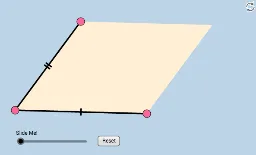
Loading the math board and drawing, please wait…
This example uses three quick investigative tools to help students recall the special properties of parallelograms. Key mathematical concepts include angles, vectors, and transformations. It utilizes GeoGebra commands such as Line, Vector, and Translate for geometric construction. Suitable for middle school and above students.
GeoGebra Commands & Parameters
Line(A, B) → aSlope(a) → mPointIn(c) → CLine(C, a) → eVector(A, B) → uTranslate(C, u) → C'Segment(A, B) → hSegment(A, C) → dPolygon(A, B, C') → poly1, c', a_1, b_1Polygon(A, C', C) → poly2, c_1, a_2, c'_1Dilate(A, If[0 < k ≤ 1, 1 - k, 0], C) → A'Vector(A, A') → vTranslate(A, v) → A'_1Translate(B, v) → B'Segment(A'_1, B') → h'Dilate(C, If[1 < k ≤ 2, 2 - k, 0], C') → C'_1Vector(C, C'_1) → wTranslate(A, w) → A'_2Translate(C, w) → C'_2Segment(A'_2, C'_2) → d'Polygon(A, B, C', C) → poly3, a_3, b_2, c'_2, c_2
AI Drawing Prompt Reference
Draw a parallelogram with points A, B, C, and C'. First, draw line segment AB, then draw a line e parallel to AB through point C. Next, draw vector AB and translate it by point C to get C'. Connect points A, B, and C' to form the first parallelogram, then connect A, C', and C to form the second parallelogram. Finally, perform a similarity transformation on points A and C' to get A' and C'_1, and draw the corresponding segments and the third parallelogram.
The prompt above was compiled from the original drawing commands and is for reference only.