
Parallelogrammatic Pyramid
Loading the math board and drawing, please wait…
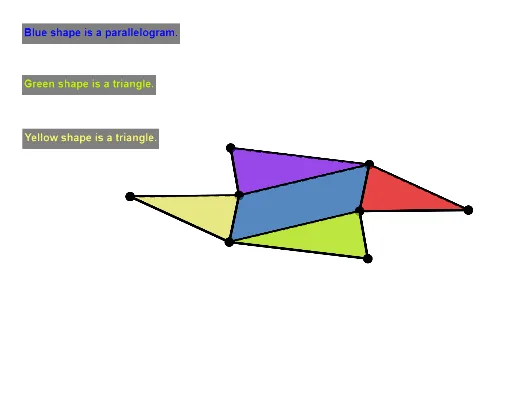
This example demonstrates the construction of a parallelogrammatic pyramid. Key mathematical concepts include polygons, solid geometry, and geometric construction. Using GeoGebra commands such as Polygon, Pyramid, and Net, the example visually illustrates the net and faces of the pyramid. Suitable for middle school and above students or teachers.
GeoGebra Commands & Parameters
Polygon(A, B, C, D) → q1, a, b, c, dPyramid(q1, f) → g, F, faceABF, faceBCF, faceCDF, faceADF, edgeAF, edgeBF, edgeCF, edgeDFNet(g, OpenClose) → h, E, faceEGJ, faceGHK, faceHIL, faceEIM, edgeEG, edgeGH, edgeHI, edgeEI, edgeEJ, edgeGJ, G, edgeGK, edgeHK, edgeHL, edgeIL, edgeIM, edgeEM, H, I, J, K, L, M, faceEGHIOrthogonalLine(B, edgeEI, space) → iIntersect(i, edgeEI) → NAngle(B, N, A) → αPointIn(faceEGHI) → PointfaceEGHIOrthogonalLine(K, edgeGH, space) → kIntersect(k, edgeGH) → OOrthogonalLine(M, edgeEI, space) → mIntersect(m, edgeEI) → PAngle(M, P, D) → γOrthogonalLine(J, edgeEG, space) → pOrthogonalLine(L, edgeHI, space) → qIntersect(edgeHI, q) → QIntersect(edgeEG, p) → SAngle(J, S, A) → ζSegment(S, J) → f_1Segment(P, M) → g_1Segment(N, B) → i_1Segment(D, C) → m_1Segment(C, B) → n_1Intersect(edgeEJ, edgeGJ) → RIntersect(edgeEM, edgeIM) → TSegment(G, E) → jSegment(E, I) → lLength(d) → eLength(i_1) → nLength(g_1) → oLength(a) → rLength(f_1) → s
AI Drawing Prompt Reference
Draw a parallelogrammatic pyramid, showing its net and faces. Start by constructing a parallelogram as the base, then build the pyramid on top of it, labeling all its faces and edges. Next, create the net of the pyramid, laying out its faces flat and marking key points and edges. Finally, calculate and label some key angles and the lengths of certain segments to illustrate the geometric properties of the pyramid.
The prompt above was compiled from the original drawing commands and is for reference only.