
Oblique Cube
Loading the math board and drawing, please wait…
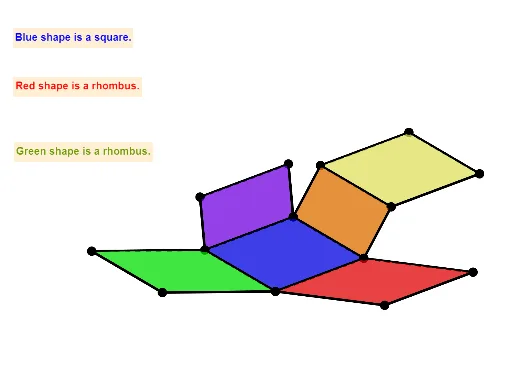
This example demonstrates the 3D shape and surface properties of an oblique cube. It involves core mathematical concepts like cubes, surface area calculation, 3D coordinate geometry, and transformations. The construction utilizes GeoGebra commands and objects such as Polygon, Segment, Prism, Net, Intersect, Angle, Length, and Distance. Suitable for high school students and math enthusiasts for learning and visualizing solid geometry.
GeoGebra Commands & Parameters
Polygon(A, B, 4, xOyPlane) → poly1, f, g, h, i, C, DSegment(A, B) → jPrism(poly1, E) → b, F, edgeBF, edgeCG, edgeDH, edgeEF, edgeFG, edgeGH, edgeEH, G, H, faceABFE, faceBCGF, faceCDHG, faceADHE, faceEFGH, edgeAENet(b, OpenClose) → d, X, T, U, V, U_1, V_1, faceIJKL, faceIJNM, faceJKPO, faceKLRQ, faceILST, Y, faceMNUV, edgeIJ, edgeJK, edgeKL, edgeIL, edgeIM, edgeMN, edgeJN, edgeJO, edgeOP, Z, edgeKP, edgeKQ, edgeQR, edgeLR, edgeLS, edgeST, edgeIT, edgeNU, edgeUV, edgeMV, W, M, N, O, P, SSegment(U, X) → kSegment(W, V) → lIntersect(l, k) → W_1Angle(U, W_1, W) → αLength(k) → eLength(l) → mDistance(W, X) → nIntersect(edgeST, edgeLS) → IIntersect(edgeIT, edgeST) → JSegment(Z, T) → pSegment(S, W) → qIntersect(p, q) → KAngle(S, K, Z) → βLength(p) → cLength(q) → oIntersect(edgeQR, edgeLR) → LIntersect(edgeQR, edgeKQ) → Q
AI Drawing Prompt Reference
Draw an oblique cube to demonstrate its 3D shape and surface properties. Start by creating a quadrilateral, then build a prism based on it with slanted sides. Next, unfold the prism to obtain its net, marking key points and edges. Calculate some angles like α and lengths of segments k and l. Additionally, mark intersection points I, J, K, L, Q on the net, and compute angle β and lengths c and o.
The prompt above was compiled from the original drawing commands and is for reference only.