
Parallelogram to Rectangle Exploration
Loading the math board and drawing, please wait…
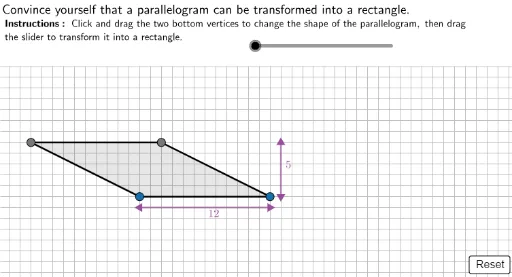
This example demonstrates how to transform a parallelogram into a rectangle through geometric transformations. Key mathematical concepts include geometric transformations, properties of parallelograms, and rectangles. Using GeoGebra commands such as Join, Point, and Polygon, the process is dynamically illustrated. Suitable for middle school and above students to learn about geometric transformations and properties of shapes.
GeoGebra Commands & Parameters
Join(Sequence[Sequence[(i, j), i, 1, 20, 1], j, 0, 17, 1]) → GridSpaceCPoint(GridSpaceC) → CJoin(Sequence[Sequence[(i, j), i, x(C) + 1, 20, 1], j, 0, 15, 1]) → GridSpaceAPoint(GridSpaceA) → APolygon((-5, 17.1), (50, 17.1), (50, 25), (-5, 25)) → TopBox, f, g, h, iSequence((i, y(A)), i, (2 * x(A)) - x(C), 40, 1) → GridSpaceBPoint(GridSpaceB) → BLine(A, C) → ACLine(A, B) → ABIntersect(Line[C, AB], Line[B, AC]) → DPolygon(A, B, D, C) → ABCD, j, k, l, mOrthogonalLine(A, Line[C, D]) → CutPolygon(C2, A2, E2) → Tri, n, p, qIntersect(Cut, Line[C, D]) → EPolygon(E, D, B, A) → Quad, e_1, d, b, a_1Segment(HeightT, HeightB) → HeightMarkerSegment(LengthL, LengthR) → LengthMarker
AI Drawing Prompt Reference
Draw a parallelogram ABCD, then transform it into a rectangle through a series of geometric transformations. First, draw the parallelogram, then draw its diagonals AC and AB, find their intersection point D, and connect points A, B, D, and C to form rectangle ABCD. Next, draw the height and length of the parallelogram, and finally use these lines to perform geometric transformations, gradually transforming the parallelogram into a rectangle.
The prompt above was compiled from the original drawing commands and is for reference only.