
Parallelogram by Marko Knežević
Loading the math board and drawing, please wait…
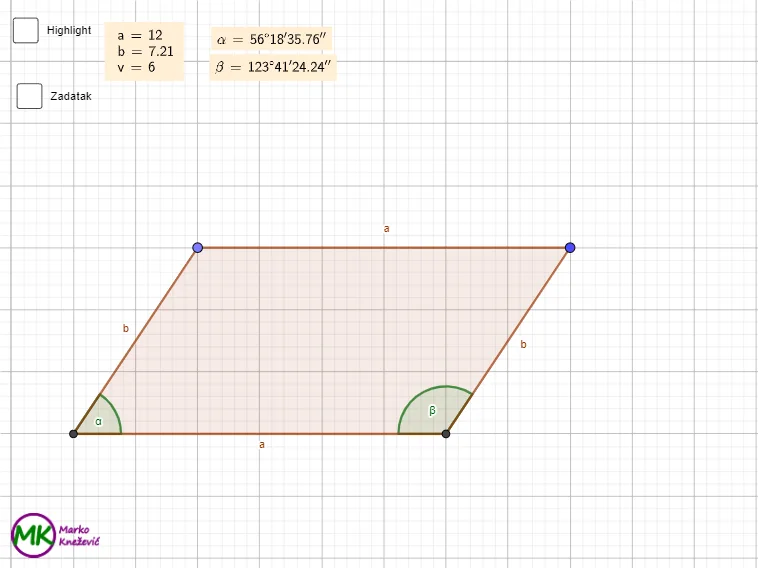
This example demonstrates the construction and properties of a parallelogram, involving key math concepts like the cosine and sine laws, trigonometry, geometric distribution, centroid, multiplication, and function graphing. It uses commands such as Intersect, Line, Point, OrthogonalLine, Segment, Polygon, Angle, TableText, and LaTeX for construction. Suitable for high school mathematics teaching and geometric construction learning.
GeoGebra Commands & Parameters
Intersect(xAxis, yAxis) → ALine(C, xAxis) → fPoint(f) → DLine(D, f) → gLine(D, A) → hLine(C, h) → iOrthogonalLine(D, xAxis) → jIntersect(i, xAxis) → BIntersect(j, xAxis) → ESegment(D, E) → vPolygon(A, B, C, D) → q1, a, b, c, dAngle(B, A, D) → αTableText({LaTeX[a, true, true]}, {LaTeX[b, true, true]}, {LaTeX[v, true, true]}) → text1Polygon(D, E, A) → t1, a_1, d_1, eAngle(C, B, A) → βAngle(D, E, A) → γLaTeX(α, true, true) → text2LaTeX(β, true, true) → text4
AI Drawing Prompt Reference
Draw a parallelogram, showing its key points and lines. Start by creating a point at the intersection of the coordinate axes, then draw a line parallel to it. Create a point on this line and connect it to the diagonal of the parallelogram. Draw a line perpendicular to the x-axis and find its intersection with the parallel line. Finally, connect these points to form the parallelogram, labeling the diagonals, angles, and side lengths to demonstrate the properties of the parallelogram and the application of trigonometric functions.
The prompt above was compiled from the original drawing commands and is for reference only.