
Euclidean Geometry Counterexamples Demo
Loading the math board and drawing, please wait…
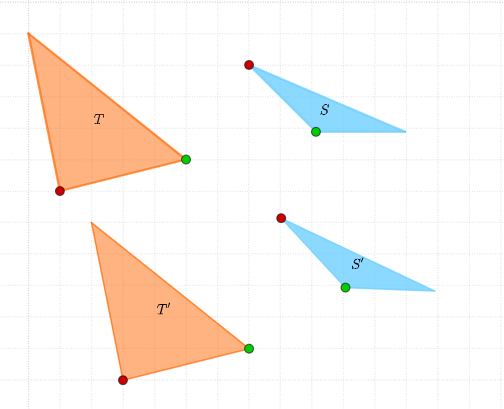
This example demonstrates counterexamples in Euclidean geometry through specific visualizations. It involves core math concepts like congruence, geometry logic, rectangles, squares, and triangles. Construction highlights include using GeoGebra commands such as Point, Polygon, and Rotate to create and manipulate objects like A, B, C, t1, c, a, b, etc. Suitable for high school and above learners to understand geometric counterexamples and logical reasoning.
GeoGebra Commands & Parameters
Point(Circle[A, 4.123105625617661]) → BPolygon(A, B, C) → t1, c, a, bPoint(Circle[G, 3]) → HPolygon(G, H, I) → t3, i, g, hPoint(Circle[J, Segment[A, B]]) → KRotate(K + (Segment[B, C], 0), Angle[C - B] + Angle[K - J] - Angle[B - A], K) → MPolygon(J, K, M) → t2, m_1, j_1, k_1Point(Circle[N, Segment[G, H]]) → ORotate(O + (Segment[H, I], 0), Angle[I - H] + Angle[O - N] - Angle[H - G], O) → PPolygon(N, O, P) → t4, p, n_1, o
AI Drawing Prompt Reference
Draw a figure with multiple geometric objects. First, draw a circle and mark a point on it. Then, draw a triangle and mark its vertices. Next, draw another circle and mark a point on it. Finally, draw a rectangle and mark its vertices. Ensure that the objects are arranged in order to show the logical relationship of geometric construction.
The prompt above was compiled from the original drawing commands and is for reference only.