
Parallelogram and Sequence Construction
Loading the math board and drawing, please wait…
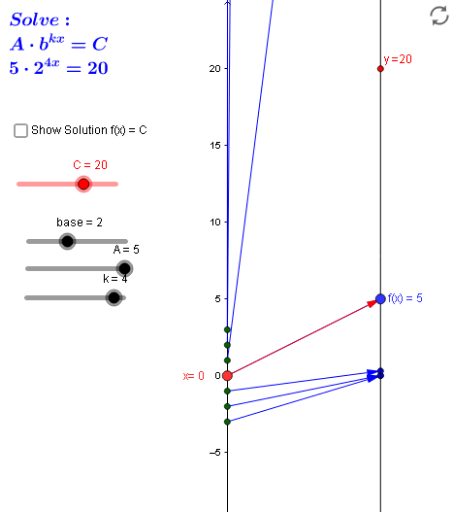
This example demonstrates how to construct a parallelogram and visualize its related sequence using GeoGebra. It involves core math concepts like parallelogram properties, Pythagorean theorem, fractal geometry, and ratios. Construction highlights include using commands such as Point, Vector, Textfield, Sequence, Intersect, and Segment. Suitable for high school mathematics education to understand geometric constructions and sequence applications.
GeoGebra Commands & Parameters
Point(yAxis) → A_1Vector(A_1, B) → uTextfield(f) → inputBox1Sequence(Vector[(0, k), (2, f(k))], k, -3, 3) → ExpMDSequence((2, f(k)), k, -3, 3) → ExpTargPtsSequence((0, k), k, -3, 3) → SourcePtsMDSequence((k, f(k)), k, -3, 3) → ExpGraphptsVector(A_1, B_2) → vSequence(Vector[(0, f(k)), (2, g(f(k)))], k, -3, 3) → logMDSequence((f(k), k), k, -3, 3) → logGraphptsSequence(Vector[(2, k), (4, f(k))], k, -3, 3) → InvLogMDVector(B_2, A_2) → wIntersect(f, b, (0.49999999995155076, 19.999999997313402)) → DVector(x_*, C_1) → zSegment(D, X) → j
AI Drawing Prompt Reference
Draw a parallelogram and construct a sequence related to it. Start by creating a point A on the y-axis, then construct vector u through points A and B. Use function f to generate a sequence ExpMD. Next, construct sequence ExpTargPts with points (2, f(k)). Then, construct sequence SourcePtsMD with points (0, k). Construct sequence ExpGraphpts with points (k, f(k)). Through points A and B, construct vector v, then use function g to generate sequence logMD. Next, construct sequence logGraphpts with points (f(k), k). Then, construct sequence InvLogMD with points (2, f(k)). Finally, construct vector w, find the intersection point D of the sequence and a line, and draw line segment j between points D and X.
The prompt above was compiled from the original drawing commands and is for reference only.