
Parallelogram and Rhombus Properties
Loading the math board and drawing, please wait…
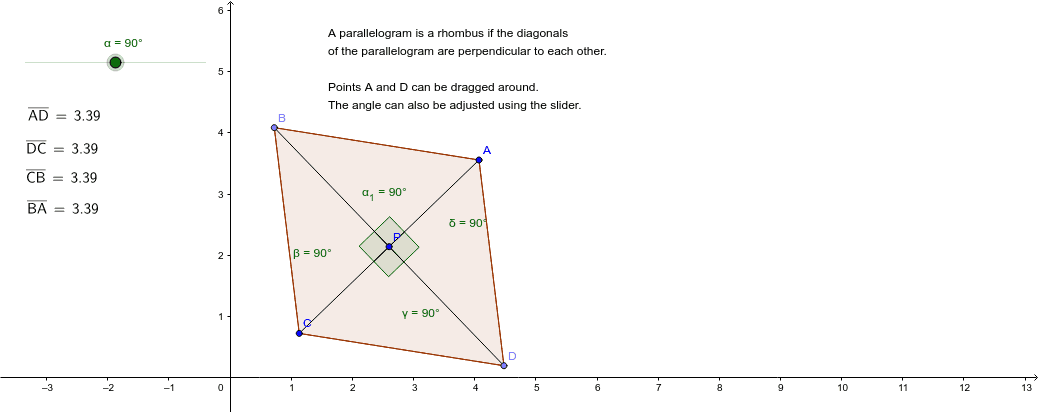
This example demonstrates that a parallelogram is a rhombus when its diagonals are perpendicular. Key mathematical concepts include parallelograms, rhombuses, and angles. Using GeoGebra commands such as Segment, OrthogonalLine, Mirror, and Rotate, specific geometric shapes are constructed. Suitable for middle school and above students to learn geometric construction.
GeoGebra Commands & Parameters
Segment(A, z) → aOrthogonalLine(z, a) → bOrthogonalLine(z, b) → cMirror(A, z) → CMirror(z, z) → PSegment(C, P) → a'Rotate(z, α, z) → B'_1Line(z, A) → dRotate(d, α, z) → d'Point(d') → DSegment(D, z) → eMirror(D, z) → BMirror(z, z) → B'_2Segment(B, B'_2) → e'Polygon(A, D, C, B) → poly1, a_1, c_1, a'_1, c'Segment(A, P) → fSegment(P, C) → gSegment(B, P) → hSegment(P, D) → iAngle(A, P, B) → α_1Angle(B, P, C) → βAngle(C, P, D) → γAngle(D, P, A) → δAngle(B, P, A) → δ_1Angle(A, P, D) → γ_1Angle(D, P, C) → β_1Angle(C, P, B) → α_2Polygon(C, D, A, B) → poly2, c_2, d_1, a_2, b_1Distance(B, A) → distanceBADistance(A, D) → distanceADDistance(C, D) → distanceCDDistance(B, C) → distanceBCDistance(D, C) → distanceDCDistance(C, B) → distanceCBDistance(B, A) → j
AI Drawing Prompt Reference
Draw a parallelogram with perpendicular diagonals to demonstrate it is a rhombus. Start by creating a segment and its perpendicular line, then mirror the perpendicular line across the segment to form another. Connect the endpoints to create the parallelogram. Rotate half of the parallelogram around the intersection point of the diagonals to form a rhombus. Label all side lengths and diagonal lengths, and measure and display all interior angles to verify the relationships between angles and sides in both shapes.
The prompt above was compiled from the original drawing commands and is for reference only.