
Parallel vs Skew Lines: 3D Geometry Investigation
Loading the math board and drawing, please wait…
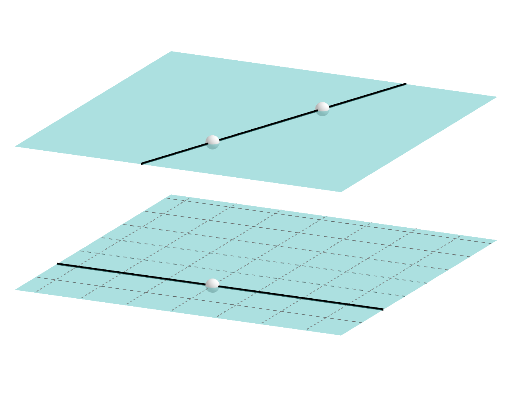
This GeoGebra example demonstrates how to determine whether two lines in 3D space are parallel or skew (non-parallel and non-intersecting). It covers key concepts in solid geometry including lines and planes, parallel lines, and skew lines. The construction uses PointIn command to create points on planes, Line command to construct lines, and Plane command to create planes, allowing dynamic observation of spatial relationships between lines. Ideal for high school students learning solid geometry and teachers demonstrating spatial geometry concepts.
GeoGebra Commands & Parameters
PointIn(z = 0) → ALine(A, B) → fPointIn(z = 3) → CPlane(A, B, C) → pPointIn(g) → DLine(C, D) → hPlane(A, C, D) → q
AI Drawing Prompt Reference
Create a 3D geometry scene to study the relationship between two lines in space. First set up a plane p defined by three points where one point A lies on the z = 0 plane, another point C lies on z = 3, and A is used together with an additional point B to determine the line f through A and B. Then construct plane p using points A, B, and C. On that plane, choose a point D. Draw a second line h passing through C and D. Finally, create another plane q determined by points A, C, and D. Ensure the two lines f and h and the two planes p and q are all visible so the spatial relationship between the lines can be examined.
The prompt above was compiled from the original drawing commands and is for reference only.