
Parallel Lines in Rhombus
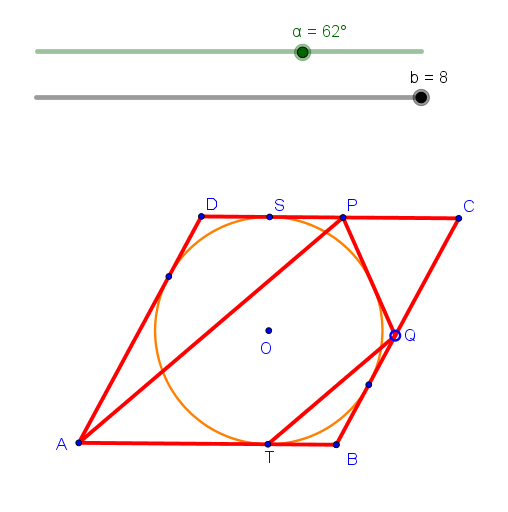
Loading the math board and drawing, please wait…
This example demonstrates the construction and properties of parallel lines within a rhombus. Key math concepts include parallel lines, symmetry of the rhombus, vectors, and geometric transformations. The construction involves commands like Segment, Rotate, Midpoint, OrthogonalLine, Intersect, Circle, Point, Tangent, Distance, Line, and Vector in GeoGebra. Suitable for high school mathematics education to understand polygonal geometric properties and transformations.
GeoGebra Commands & Parameters
Segment(A, B) → fRotate(A, ((α - 180°) * If[(b > 1) ∧ (b ≤ 2), b - 1, 1]), B) → CRotate(B, ((-α) * If[(b > 2) ∧ (b ≤ 3), b - 2, 1]), C) → DSegment(B, C) → gSegment(C, D) → hMidpoint(D, B) → OOrthogonalLine(O, f) → jIntersect(j, f) → TCircle(O, T) → cPoint(g) → QTangent(Q, c) → k, lIntersect(k, h) → PSegment(A, P) → mSegment(T, Q) → nIntersect(c, k, 1) → GIntersect(c, g, 1) → HIntersect(c, h, 1) → SDistance(O, P) → EQDistance(C, P) → CQSegment(P, Q) → pSegment(A, B_1) → qRotate(C, ((α - 180°) * If[(b > 3) ∧ (b ≤ 4), b - 3, 1]), D) → A'Segment(D, A') → iIntersect(c, i) → F, ESegment(Q, P') → rSegment(T, Q') → tSegment(A, P'') → sLine(T, r) → dIntersect(d, s) → IVector(I', T') → uVector(T', I') → v
AI Drawing Prompt Reference
Draw a rhombus and demonstrate the construction and properties of parallel lines within it. Start by constructing the diagonals of the rhombus, then use rotations and symmetry to create parallel lines. Find the midpoints of the diagonals and draw a line perpendicular to one diagonal, intersecting at key points. Next, draw a circle centered at a midpoint, passing through an intersection point, and find the tangent points on the sides of the rhombus. Connect these points to form the parallel lines. Highlight key points and lines to show symmetry and vector relationships.
The prompt above was compiled from the original drawing commands and is for reference only.