
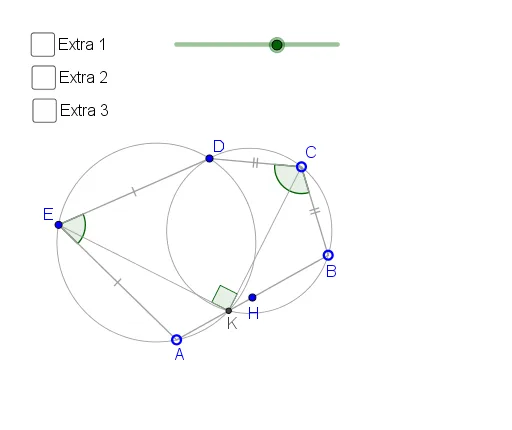
Pentagon with Related Angles
Loading the math board and drawing, please wait…
This example demonstrates the geometric relationship between two related angles within a pentagon. It involves core mathematical concepts such as circumcircle angles, similar triangles, differential calculus, inequalities, and reflection. The construction utilizes GeoGebra commands and objects like Rotate, Ray, Circle, Segment, OrthogonalLine, Midpoint, LineBisector, Semicircle, Intersect, and Angle. It is suitable for high school students and educators exploring geometric properties and advanced mathematical applications.
GeoGebra Commands & Parameters
Rotate(B, (-ε), C) → DRotate(A, ((-ε)) / 2, D) → A'Ray(D, A') → bRotate(D, ε / 2, A) → D'Ray(A, D') → qCircle(C, B) → cSegment(C, B) → gOrthogonalLine(C, g) → jSegment(A, B) → fMidpoint(A, B) → HSegment(D, C) → hLineBisector(D, A) → iSemicircle(A, D) → dIntersect(b, q) → ESegment(E, D) → kSegment(E, A) → lSegment(A, H) → mSegment(H, B) → nAngle(A, E, D) → αAngle(D, C, B) → βCircle(E, D, A) → eCircle(D, C, B) → pIntersect(e, p, 2) → KAngle(C, K, E) → γSegment(K, C) → rSegment(K, E) → sCircle(E, C, K) → tLineBisector(A, D) → a_1LineBisector(D, B) → b_1Intersect(b_1, s) → FIntersect(a_1, r) → GRotate(E, β, C) → E'Segment(E, H) → f_1Segment(H, E') → g_1Segment(C, E) → h_1Segment(C, E') → i_1Segment(C, H) → j_1Segment(D, B) → l_1Segment(D, A) → m_1Angle(C, H, E) → δSegment(D, K) → k_1
AI Drawing Prompt Reference
Draw a pentagon and construct two related angles α and β. Start by drawing a circle around point C, then use rotations and reflections to generate points D, A', D', etc. Next, draw angles α and β. Finally, use a series of rotations, reflections, and intersection operations to construct the third angle γ related to α and β.
The prompt above was compiled from the original drawing commands and is for reference only.