
Parallel and Perpendicular Lines Construction
Loading the math board and drawing, please wait…
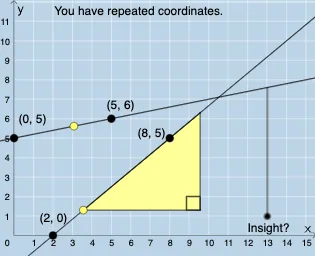
This example demonstrates how to use GeoGebra to draw parallel and perpendicular lines. Key mathematical concepts include the slope and equation of a line. Using commands like PointIn, Line, Slope, Intersect, students can explore the length of line segments, angles, and transformations. Suitable for middle school and above students for geometric construction and exploration.
GeoGebra Commands & Parameters
PointIn(e) → APointIn(e) → BPointIn(e) → CPointIn(e) → DLine(A, B) → fLine(C, D) → gMode(l1) → l2Length(l2) → hIntersect(f, g) → EAngle(f, g) → αIf(h ≟ 0, "(1) is true", "(1) is false") → text2If(α ≟ pi / 2, "(2) is true", "(2) is false") → text3Point(f) → FPoint(g) → GSlope(f) → jSlope(g) → kNumerator(j) → lDenominator(j) → mNumerator(k) → nDenominator(k) → oPolygon(F, (x(F) + m, y(F)), (x(F) + m, y(F) + l)) → t1, p, f_1, qSegment(F, H) → rSegment(H, I) → sDilate(F, If[0 < t ≤ 1, 1 - t, 0], G) → F'Vector(F, F') → uTranslate(t1, u) → t1'Translate(H, u) → H'Translate(I, u) → I'Segment(H', I') → s'Translate(F, u) → F'_{1}Translate(H, u) → H'_{1}Segment(F'_{1}, H'_{1}) → r'Segment(F, I) → g_1Translate(F, u) → F'_{2}Translate(I, u) → I'_{1}Segment(F'_{2}, I'_{1}) → h_1If(j ≟ k, 1, 2) → wRotate(t1', If[t > 1, (pi / 2 * (t - 1)), pi / 2], G) → t1''Rotate(F'_{1}, If[t > 1, (pi / 2 * (t - 1)), pi / 2], G) → LRotate(H'_{1}, If[t > 1, (pi / 2 * (t - 1)), pi / 2], G) → MSegment(L, M) → r''Rotate(H', If[t > 1, (pi / 2 * (t - 1)), pi / 2], G) → H''Rotate(I', If[t > 1, (pi / 2 * (t - 1)), pi / 2], G) → I''Segment(H'', I'') → s''Rotate(F'_{2}, If[t > 1, (pi / 2 * (t - 1)), pi / 2], G) → NRotate(I'_{1}, If[t > 1, (pi / 2 * (t - 1)), pi / 2], G) → OSegment(N, O) → i_1Angle(I, H, F) → βAngle(I', H', F'_{1}) → γAngle(I'', M, G) → δAngle(H', G, M) → εIf(Length[l2] ≟ 0, "No coordinates repeat.", "You have repeated coordinates.") → text5
AI Drawing Prompt Reference
Draw two parallel and two perpendicular lines, showing their intersection points, angles, and segment lengths. Mark points on the lines, draw the lines, and calculate their slopes and lengths. Label the intersection point, angle, and check if the segment length is zero or the angle is a right angle. Then, based on a point on the first line, perform scaling, translation, and rotation to demonstrate the transformation relationships of parallel and perpendicular lines.
The prompt above was compiled from the original drawing commands and is for reference only.