
Parabola Rotated Around the Y-Axis
Loading the math board and drawing, please wait…
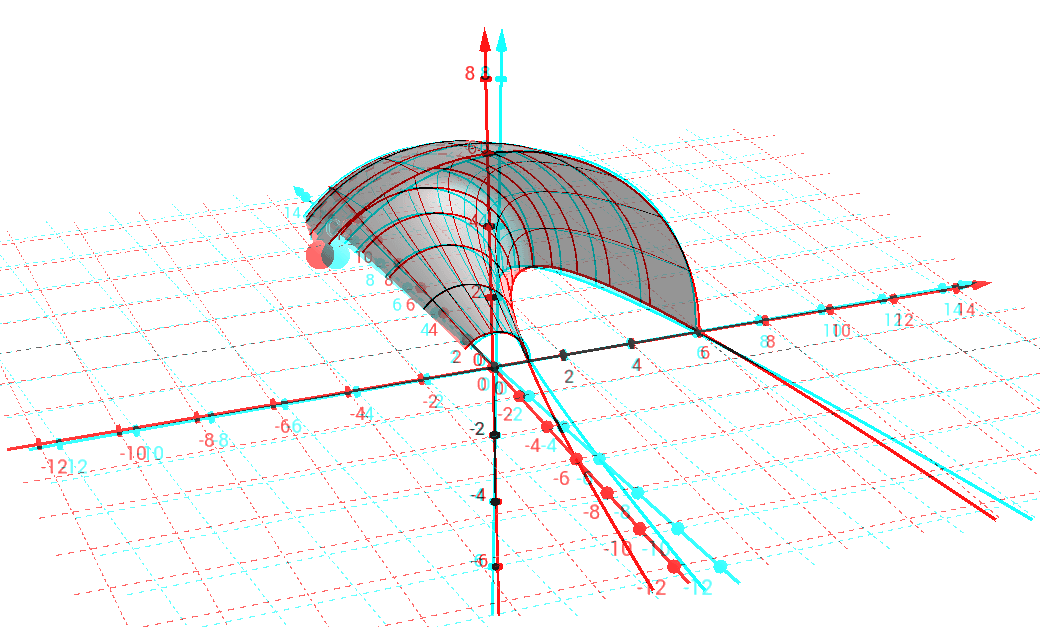
This example demonstrates a parabola rotated around the y-axis, creating a three-dimensional surface of revolution. By dragging point C, users can dynamically explore how the parabola sweeps out the surface. The core mathematical concepts include quadratic functions, solids of revolution, parametric surfaces in 3D, and the use of definite and indefinite integrals for computing volume or surface area. The construction uses GeoGebra commands such as Intersect, Circle, Point, Angle, CircleArc, Surface, Sequence, and LaTeX, involving objects like the parabola f, points A, B, C, angle α, line d, circle a, lists list1 and list2, and text1. The Surface command generates the rotational surface, while Sequence creates discrete cross-sections. This is suitable for upper high school or early university students to grasp the geometric intuition of revolution solids, parametric surface representation, and the practical role of integration in geometry. It also serves as an interactive teaching aid in calculus courses.
GeoGebra Commands & Parameters
Intersect(f, xAxis, 2) → AIntersect(zAxis, xAxis) → BCircle(yAxis, A) → cPoint(c) → CAngle(A, B, C) → αCircleArc(B, A, C) → dSurface((t * cos(u)), f(t), (t * sin(u)), t, 1, 6, u, 0, If[z(C) ≥ 0, α, (2 * π) - α]) → aSequence(CurveCartesian[(t * cos(u)), f(t), (t * sin(u)), t, 1, 6], u, 0, If[z(C) ≥ 0, α, (2 * π) - α], 0.3141592653589793) → list1Sequence(CurveCartesian[(t * cos(u)), f(t), (t * sin(u)), u, 0, If[z(C) ≥ 0, α, (2 * π) - α]], t, 1, 6, 0.5) → list2LaTeX(C, true, true) → text1