
Parabola Construction on a Sphere
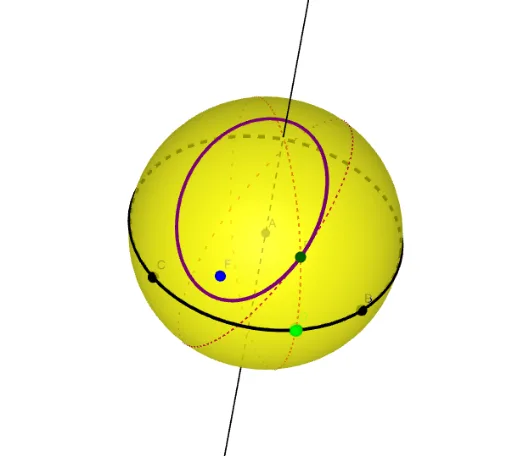
Loading the math board and drawing, please wait…
This example demonstrates how to construct a parabola on a sphere. It involves core mathematical concepts such as spherical geometry, analytical geometry, and locus. Key construction steps include using GeoGebra commands like Intersect, Sphere, PointIn, Plane, IntersectPath, Point, OrthogonalLine, Segment, Midpoint, OrthogonalPlane, and Locus. Suitable for high school and above students to explore properties of spherical geometry.
GeoGebra Commands & Parameters
Intersect(yAxis, zAxis) → ASphere(A, 1) → aPointIn(a) → FPointIn(a) → BPointIn(a) → CPlane(C, B, A) → bIntersectPath(b, a) → cPoint(c) → DOrthogonalLine(A, c) → fPlane(D, f) → dIntersectPath(d, a) → eSegment(F, D) → gMidpoint(F, D) → EOrthogonalPlane(E, g) → hIntersectPath(h, a) → kIntersect(e, k, 2) → PLocus(P, D) → loc1
AI Drawing Prompt Reference
Construct a parabola on a sphere. Start by establishing the coordinate axes and creating a sphere with center at the origin and radius 1. Then select three points F, B, and C on the sphere, and use points C, B, and A to construct a plane b that intersects the sphere to form a curve c. On curve c, select point D, and construct a line f perpendicular to AD through point A and D. Use point D and line f to construct a plane d that intersects the sphere to form a curve e. Connect points F and D, find the midpoint E, and construct a plane h perpendicular to ED through point E and line ED, which intersects the sphere to form a curve k. Finally, find a point P on the intersection of curves e and k, and construct the locus of point P with respect to line ED as loc1.
The prompt above was compiled from the original drawing commands and is for reference only.