
Pac Man Transformations Intro
Loading the math board and drawing, please wait…
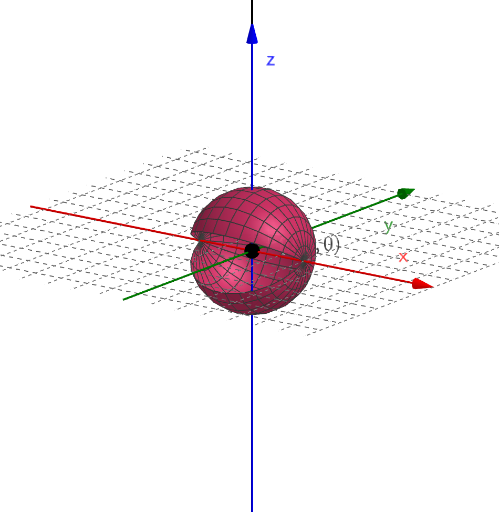
This example demonstrates the transformation phenomena in Pac Man, focusing on geometric transformations, rotation, translation, and other related concepts. The construction uses GeoGebra commands such as CurveCartesian, Surface, Mirror, Vector, Translate, and Line, with objects like curves, points, vectors, and lines. It is suitable for middle school or high school students learning geometric transformations and graph drawing. Keywords include geometric transformations, rotation, translation, curve drawing, and more.
GeoGebra Commands & Parameters
CurveCartesian((r * cos(t)), (r * sin(t)), t, 0, pi) → aSurface(a, n, xAxis) → bMirror(b, Plane[(0, 0, 0), (1, 0, 0), (1, 1, 0)]) → b'Vector((c_1, c_2, c_3)) → uTranslate(b, u) → b'_1Translate(b', u) → b''Line((c_1, c_2, c_3), (c_1, c_2, c_3 + 1)) → fRotate(b'_1, m, f) → cRotate(b'', m, f) → b'''
AI Drawing Prompt Reference
In a 3D coordinate space, first draw a planar curve given by a parametric form: use radius r with angle parameter t running from 0 to π to form a circular-arc style shape. Extend this curve into a surface. Mirror that surface across a plane that passes through the origin and is defined by the directions (0,0,0), (1,0,0), (1,1,0), producing a mirrored surface. Create a translation vector u, then translate the mirrored surface along u to get one shifted surface, and translate again by the same u to get a second shifted surface farther away. Draw a line f using two points on the line defined by (c1,c2,c3) and (c1,c2,c3+1). Finally, rotate the first shifted surface around the axis line f and also rotate the second shifted surface around the same axis, producing two rotated surface shapes.
The prompt above was compiled from the original drawing commands and is for reference only.