
Orthocenter of Acute and Obtuse Triangles
Loading the math board and drawing, please wait…
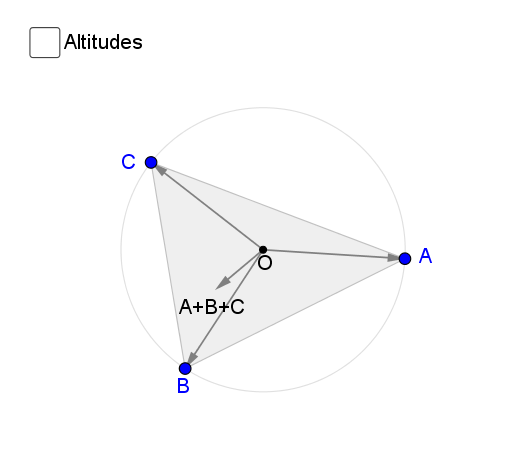
①This interactive GeoGebra example dynamically demonstrates the orthocenter (intersection of the three altitudes) of acute and obtuse triangles, showing how its position changes from inside the triangle (acute) to outside (obtuse), and even at a vertex for right triangles. ②Core mathematical concepts include the orthocenter, altitudes, perpendicularity, triangle classification by angles, and the relative position of the orthocenter with respect to the triangle's sides and vertices. ③Construction details: using GeoGebra commands such as Circle, Point, Line, Segment, Vector, Polygon, OrthogonalLine, and Intersect, the example constructs triangle ABC, its circumcircle, and the three altitudes via orthogonal lines; the intersection point H is the orthocenter, with auxiliary points, segments, vectors, and text labels clarifying the geometry. ④This resource is suitable for middle or high school geometry lessons and self-study, helping students grasp the definition and properties of the orthocenter, observe how its location varies with triangle type, and explore relationships with other triangle centers like the centroid or circumcenter.
GeoGebra Commands & Parameters
Circle(O, X) → cPoint(c) → APoint(c) → BPoint(c) → CLine(B, O) → hLine(C, O) → iSegment(B, A) → jSegment(C, A) → mVector(O, C) → uVector(O, A) → vVector(O, B) → wVector(O, D) → aPolygon(B, C, A) → poly1, a_1, b, c_1Line(B, A) → lLine(A, C) → nLine(C, B) → pOrthogonalLine(A, p) → gOrthogonalLine(C, l) → kOrthogonalLine(B, n) → fIntersect(p, g) → EIntersect(l, k) → FIntersect(n, f) → GSegment(A, E) → qSegment(B, G) → rSegment(C, F) → sSegment(A, D) → tSegment(D, F) → eSegment(D, G) → f_1Segment(A, G) → g_1Segment(B, E) → h_1Segment(B, F) → i_1