
Parabola Construction: Locus via Right Triangles and Perpendicular Bisectors
Loading the math board and drawing, please wait…
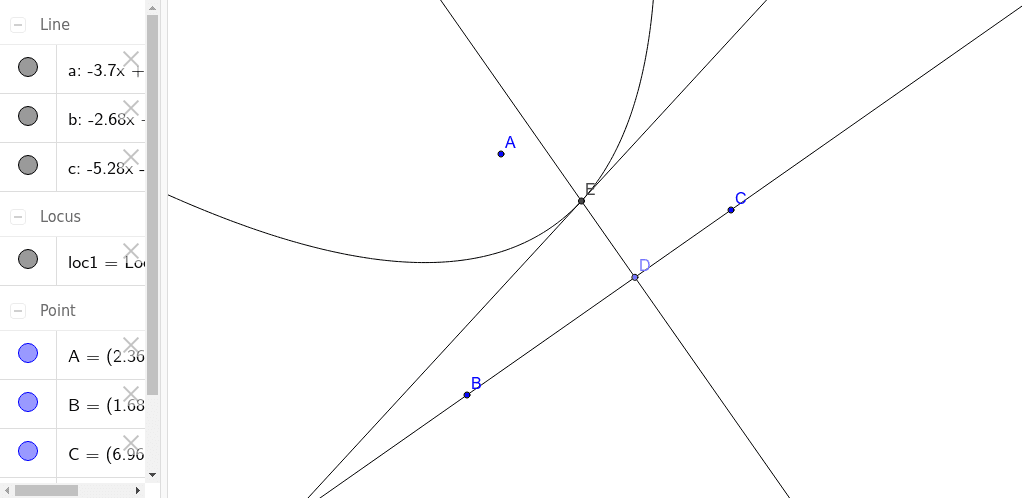
This example demonstrates how to construct a parabola through geometric construction, using right triangles and perpendicular bisectors to generate the locus of a moving point. The core mathematical concept is the definition of a parabola as the set of points equidistant from a fixed point (focus) and a fixed line (directrix). The construction steps involve creating lines and points with the Line and Point commands, building perpendicular bisectors with LineBisector, drawing perpendicular lines with OrthogonalLine, finding intersections via Intersect, and finally using the Locus command to trace the parabola. This activity is suitable for upper middle school or high school students, helping them grasp the geometric nature of conic sections and the power of dynamic geometry software in exploring loci and constructions.
GeoGebra Commands & Parameters
Line(B, C) → aPoint(a) → DLineBisector(A, D) → bOrthogonalLine(D, a) → cIntersect(b, c) → ELocus(E, D) → loc1
AI Drawing Prompt Reference
Construct a parabola by generating the locus of a moving point using right triangles and perpendicular bisectors. Start by drawing a line, then take a point on this line, construct the perpendicular bisector of this point relative to the line, draw a perpendicular line through this point, find the intersection of these two lines, and finally use these intersection points to trace the parabola.
The prompt above was compiled from the original drawing commands and is for reference only.