
Optimization: Area of Window (Rectangle + Semicircle)
Loading the math board and drawing, please wait…
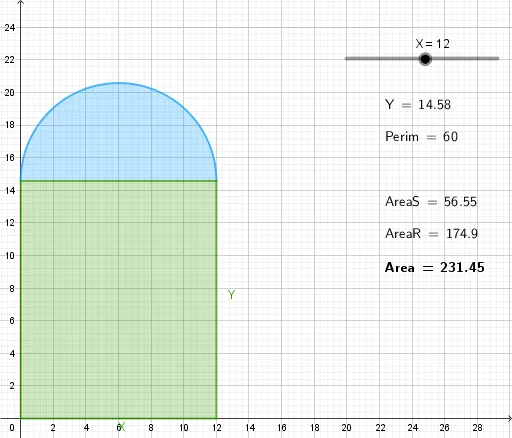
This GeoGebra example demonstrates a classic optimization problem: for a window composed of a rectangle topped with a semicircle, given a fixed total perimeter, find the dimensions that maximize the total area. The core mathematical concepts involve derivative-based extremum finding, constrained optimization, and area formulas for composite shapes. The construction uses GeoGebra commands such as Intersect to define key points, Polygon and Semicircle to build the window shape, and LaTeX text objects to display area and perimeter expressions. Dynamic sliders or draggable points allow real-time exploration of how changing dimensions affects the area. This is ideal for high school or college calculus courses when teaching applications of derivatives, or for math modeling activities that connect geometry with optimization. It helps students visualize the relationship between constraints, variables, and the objective function.
GeoGebra Commands & Parameters
Intersect(xAxis, yAxis) → APolygon(A, B, C, D) → q1, a, b, c, dSemicircle(D, C) → eLaTeX(Area, true, true) → text1LaTeX(AreaR, true, true) → text2LaTeX(AreaS, true, true) → text3LaTeX(Perim, true, true) → text4LaTeX(Y, true, true) → text5