
Optimal Relative Positioning of Repulsive Particles on a Circle
Loading the math board and drawing, please wait…
In collections
₃Point estimators of location on a circle for a points set
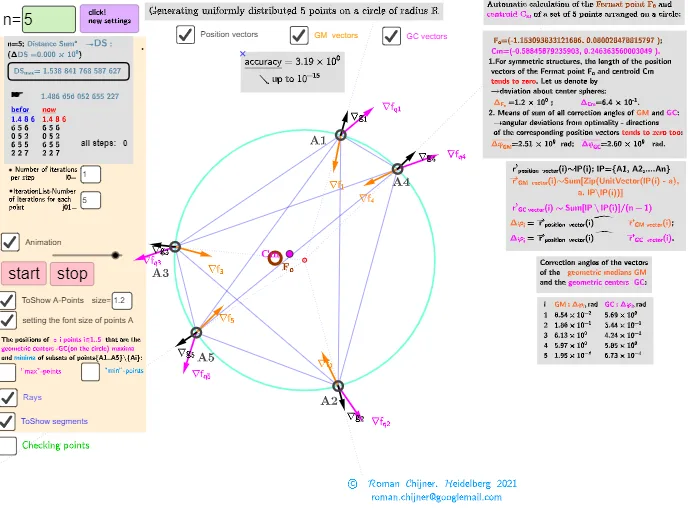
This example demonstrates how to find and visualize the optimal relative placement of a set of “repulsive” particles constrained to a circle. By parameterizing particle locations along the circumference and building a repulsion-style objective (e.g., based on pairwise distances and their aggregate sum), the construction supports interactive exploration until the configuration achieving an optimum is identified. The key mathematics includes circular/angle geometry, vector/point parameterization on a circle, summation-based objective function construction, and optimization-problem thinking (turning a geometric configuration into a computable target). Construction details are drawn from the GeoGebra command set: Circle for the base circle; Sequence to generate the discrete particle points on the circumference; Segment plus Length to form and measure pairwise distances; Sum (including variables such as Sum_{max}) to accumulate the objective; Text and LaTeX to label equations and results, with Textfield/InputBox controls to adjust parameters; additional labeling/format commands like RotateText and UnicodeToLetter for clear annotation of angles/directions. Suitable for high school to early-undergraduate learners in mathematical modeling, geometry-based optimization, and graphing/visual analytics of objective functions.
GeoGebra Commands & Parameters
Text("" + Sum_{max}) → txt_pmaxText("" + Um1) → txt_pSum(Flatten[Sequence[Append[Sequence[Element[txt_pmax, i], i, m1(k), m2(k)], " "], k, 1, 5]]) → txtUm1maxSum(Flatten[Sequence[Append[Sequence[Element[txt_p, i], i, m1(k), m2(k)], " "], k, 1, 5]]) → txtUm1Circle((0, 0), R) → p1Textfield(n) → InputBox1Sequence(Point[p1, random()], i, 1, n) → l2Textfield(i0) → InputBox2Textfield(R) → InputBox3Zip(ScientificText[a, 3], a, Wii_Pc) → l1cZip(ScientificText[a, 3], a, Wii_P) → ll1TableText(Append["i", 1…n], Append[" \fgcolor{orange}{GM :Δφ_i}, rad", ll1], Append["\fgcolor{magenta}{GC :Δφ_i} , rad", l1c], "v") → text23LaTeX(Um0) → lll0LaTeX(Um1) → lll1TableText(ltxt0, ltxt1, "v") → textltxt01UnicodeToLetter(34) → u34Textfield(gg) → InputBox4Sequence(Text["" + (i), Wi_Pc1(i) + (0.25, 0.25), true, true], i, 1, n) → l4bSegment(R1q, R2q) → jqSegment(R0q, R01q) → hqSegment(R0, R01) → hSegment(R1, R2) → jRotateText(text15, 90°) → text16Text(("\underline{accuracy}= " * ScientificText[c, 3]) + "\\\;\;\;\;\;↘ up\; to\; 10^{-15} ", C, true, true) → text8Textfield(j01) → InputBox5Sequence(Text["" + (i), Wi_Pc2(i) + (0.25, 0.25), true, true], i, 1, n) → l4aSequence(Sequence[Segment[Element[lP, k], Element[lP, t]], t, k + 1, n], k, 1, n - 1) → l1Zip(Ray[(0, 0), a], a, lP) → l3Zip(Vector[a, a + (1.5 * UnitVector[b])], a, lP, b, Wi_P) → lVectorGMZip(Vector[a, a + (1.7 * UnitVector[b])], a, lP, b, Wi_Pc2) → lVectorGCZip(Vector[x0, x0 + UnitVector[x0]], x0, lP) → lVectorPZip(Text[" ∇f _{" + (a) + "}", b, true, true], a, 1…n, b, (-(0.25, 0.25)) + lP + lVectorGM) → lGMZip(Text[" ∇f_q _{" + (a) + "}", b, true, true], a, 1…n, b, (0.25, 0.25) + lP + lVectorGC) → lGCZip(Text[" ∇g _{" + (a) + "}", b, true, true], a, 1…n, b, lP + lVectorP) → lPVSequence(((Angle[Wi_Pc2(k)] / (180°) * π), (n / 2 * Sum[Zip[Segment[a, Wi_Pc2(k)]^(2), a, lP \ {lP(k)}]] / ((((0.5 * n) * (n - 1)) * R)) / Sumq_{max})), k, 1, n) → LrqSegment((0, y(Aa)), ((2 * π), y(Aa))) → segSequence(((Angle[lP(k)] / (180°) * π), ((n / 2 * Sum[Zip[Segment[a, lP(k)], a, lP \ {lP(k)}]] / ((((0.5 * n) * (n - 1)) * R)) / Sum_{max}) * 0.8)), k, 1, n) → LrLength(lP) → lä
AI Drawing Prompt Reference
Draw a circle with several particles placed on its circumference, parameterized by angles. The particles repel each other, and the objective function is the sum of all pairwise distances. By adjusting parameters, explore particle distributions to find the optimal configuration. The figure includes the circle, particle points, line segments for pairwise distances, and objective function value labels. Construction order: draw the circle, generate particle points, compute pairwise distances, sum them to get the objective value, and label.
The prompt above was compiled from the original drawing commands and is for reference only.