
Open Middle Method: Geometric Construction for a Trapezoid Area Problem
Loading the math board and drawing, please wait…
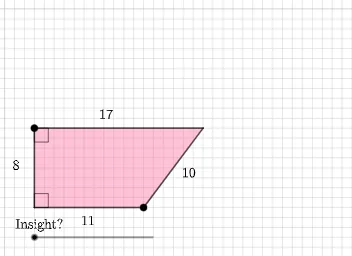
This GeoGebra example uses an “open middle” approach to guide students toward determining and verifying the area of a trapezoid by constructing an auxiliary configuration that makes the key relationships visible. It centers on trapezoids and polygon area, geometric construction logic (intersections, rays/segments, midpoints), and the link between geometric constraints and calculation ideas (the project also signals an integral-style area interpretation). The construction leverages Intersect to create crucial intersection points; Point/Segment/Ray/Polygon to build and organize the trapezoid and supporting lines; Midpoint to impose midpoint constraints; Rotate and Angle to establish rotational and angular relations (useful for similarity/angle-chasing arguments); Ellipse together with PointIn to restrict points to an ellipse-defined locus or condition; and SurdText plus Textfield to display exact expressions (including radicals) and enable interactive parameter handling. The involved objects include labeled points (e.g., P, A, B, C, D, E, h, i, d, etc.) and transformed counterparts (e.g., A', B', C', D', E'), supporting a comparison between original and constructed geometry. Suitable for secondary/contest-level geometry lessons and for interactive explorations connecting geometric reasoning to quantitative computation.
GeoGebra Commands & Parameters
Intersect(xAxis, yAxis) → APoint(Ray[(0, 1), (0, 2)]) → BSegment(A, B) → hRay(B, B + (1, 0)) → iPoint(Ray[A, A + (1, 0)]) → ESegment(A, E) → jEllipse(B, E, (1 / 2 * (P - h - j))) → eIntersect(e, f) → C, DPolygon(B, D, E, A) → q1, b, d_1, e_1, aPointIn(q1) → Pointq1Midpoint(D, E) → FRotate(B, ((-π) * d), F) → B'Rotate(D, ((-π) * d), F) → D'Rotate(E, ((-π) * d), F) → E'Rotate(A, ((-π) * d), F) → A'Polygon(B', D', E', A') → q1', b', d', e', a'Segment(B, D) → gSegment(D, E) → kSegment(A', B') → lSegment(B', D') → mSegment(D', E') → nSegment(E', A') → pAngle(E', A', B') → αAngle(A', B', D') → βAngle(E, A, B) → γAngle(A, B, D) → δSurdText(g) → text1SurdText(k) → text2SurdText(Distance[D', B']) → text3Textfield(P) → InputBox1
AI Drawing Prompt Reference
Construct a coordinate plane with the x- and y-axes and mark their intersection as the main reference point. Choose a point on a vertical ray from the reference and another point on a horizontal ray direction from the same reference, then draw the corresponding connecting segments to form the initial supporting sides. Define an ellipse using the two key points and the lengths implied by the previously created segments, so the ellipse acts as a constraint locus. Intersect the ellipse with the appropriate second curve to obtain two additional critical points, and use these points together with the original ones to draw a polygon representing the trapezoid-like region. Find the midpoint of the segment between the two ellipse-intersection points. Rotate selected vertices about this midpoint by a parameter-dependent angle to create the primed image points and draw the rotated quadrilateral/polygon for comparison. Measure several angles at both the rotated and original configurations, and display text labels with surd expressions derived from certain edge lengths and distances, while keeping a parameter input available for interactive changes.
The prompt above was compiled from the original drawing commands and is for reference only.