
Geometric Construction Linking Logarithms and Definite Integrals (Task 6)
Loading the math board and drawing, please wait…
In collections
Simplifying Radicals: Geometric Thin Slice
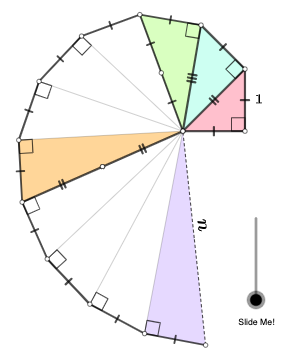
This GeoGebra task uses a sequence of geometric constructions and transformations to visually connect a quantity involving a logarithm with the idea represented by a definite integral (e.g., accumulated area/total effect). The example centers on logarithms (Logarithm) and the geometric meaning of definite integrals (Definite Integral), reinforced by using angles and similarity-style transformations to build computable relations from the diagram. Construction-wise, it starts with core geometric primitives: Polygon for the main region, Circle for circular structures, Line/Segment for boundaries, and Intersect to locate key points from crossings. Midpoint is used for accurate reference positioning, while OrthogonalLine provides perpendicular relationships and Angle records/controls the essential angular information. Then Rotate, Dilate, Translate, and Vector are applied to map and reconfigure parts of the geometry, effectively turning intermediate shapes into a representation aligned with the target logarithmic/integral interpretation. Suitable for high school advanced learners and early undergraduate students, especially for visualizing connections between functions and calculus and for guided exploration in math classes.
GeoGebra Commands & Parameters
Polygon(A, B, C) → t1, c, a, bOrthogonalLine(C, b) → fCircle(C, 1) → dIntersect(d, f, 1) → DSegment(A, D) → gOrthogonalLine(D, g) → hCircle(D, 1) → eIntersect(e, h, 2) → ESegment(A, E) → iOrthogonalLine(E, i) → jCircle(E, 1) → kIntersect(k, j, 2) → FSegment(A, F) → lOrthogonalLine(F, l) → mCircle(F, 1) → pIntersect(p, m, 2) → GSegment(A, G) → nOrthogonalLine(G, n) → qCircle(G, 1) → rIntersect(r, q, 2) → HSegment(A, H) → sOrthogonalLine(H, s) → tCircle(H, 1) → c_1Intersect(c_1, t, 2) → ISegment(A, I) → f_1OrthogonalLine(I, f_1) → g_1Circle(I, 1) → d_1Intersect(d_1, g_1, 2) → JSegment(A, J) → h_1OrthogonalLine(J, h_1) → i_1Circle(J, 1) → e_1Intersect(e_1, i_1, 2) → KSegment(A, K) → j_1OrthogonalLine(K, j_1) → k_1Circle(K, 1) → p_1Intersect(p_1, k_1, 2) → LSegment(A, L) → l_1OrthogonalLine(L, l_1) → m_1Circle(L, 1) → q_1Intersect(q_1, m_1, 2) → MSegment(A, M) → n_1OrthogonalLine(M, n_1) → r_1Circle(M, 1) → s_1Segment(C, D) → m_2Segment(D, E) → n_2Segment(E, F) → p_2Segment(F, G) → q_2Segment(G, H) → r_2Segment(H, I) → s_2Segment(I, J) → t_2Segment(J, K) → a_2Segment(K, L) → b_2Segment(L, M) → f_3Angle(C, B, A) → αAngle(D, C, A) → βAngle(E, D, A) → γAngle(F, E, A) → δAngle(G, F, A) → εAngle(H, G, A) → ζAngle(I, H, A) → ηAngle(J, I, A) → θAngle(K, J, A) → ιAngle(L, K, A) → κAngle(M, L, A) → λSegment(A, B) → l_3Segment(C, B) → m_3Segment(C, A) → n_3RotateText(text1_{1}, atand(Slope[n_3])) → text2RotateText(text3, atand(Slope[g])) → text4Midpoint(f_1) → SMidpoint(n_1) → TRotateText(text5, pi / 4) → text6RotateText(text7, atan(Slope[g])) → text8RotateText(text9, atand(Slope[i])) → text10Rotate(D, If[0 < o ≤ 1, ((-o) * pi / 3), ((-pi)) / 3], E) → D'Rotate(E, If[0 < o ≤ 1, ((-o) * pi / 3), ((-pi)) / 3], E) → E'Segment(D', E') → p_3Rotate(D', If[1 < o ≤ 2, ((-(o - 1)) * pi), (-pi)], D') → D''Rotate(E', If[1 < o ≤ 2, ((o - 1) * pi), pi], D') → E''Segment(D'', E'') → q_3Dilate(A, If[3 < o ≤ 4, 4 - o, 0], I) → A'Vector(A, A') → uTranslate(C, u) → C'Translate(A, u) → A'_{1}Segment(C', A'_{1}) → r_3Translate(C, u) → C'_{1}Angle(A, I, C'_{1}) → σRotate(C', If[4 < o ≤ 5, ((-(o - 4)) * σ), (-σ)], I) → C''Rotate(A'_{1}, If[4 < o ≤ 5, ((-(o - 4)) * σ), (-σ)], I) → USegment(C'', U) → s_3Segment(A, S) → t_3Segment(S, I) → a_3Rotate(C'', If[5 < o ≤ 6, ((o - 5) * pi), pi], S) → C'''Rotate(U, If[5 < o ≤ 6, ((o - 5) * pi), pi], S) → U'Segment(C''', U') → b_3Angle(I, A, M) → τRotate(U', If[7 < o ≤ 8, ((o - 7) * τ), τ], A) → U''Dilate(A, If[7 < o ≤ 8, 8 - o, 0], M) → A'_{2}Vector(A, A'_{2}) → vTranslate(A, v) → A'_{3}Translate(D, v) → D'_{1}Segment(A'_{3}, D'_{1}) → g'Segment(M, T) → c_3Segment(T, A) → d_3Line(M, A) → e_3Point(e_3) → VAngle(D, A, V) → χRotate(A'_{3}, If[8 < o ≤ 9, ((o - 8) * χ), χ], M) → WRotate(D'_{1}, If[8 < o ≤ 9, ((o - 8) * χ), χ], M) → ZSegment(W, Z) → g''Rotate(W, If[9 < o ≤ 10, ((-(o - 9)) * pi), (-pi)], Z) → W'Rotate(Z, If[9 < o ≤ 10, ((o - 9) * pi), pi], Z) → Z'Segment(W', Z') → g'''Polygon(A, B, C) → t2, c_4, a_4, b_4Polygon(A, C, D) → t3, d_4, a_5, c_5Polygon(A, D, E) → t4, e_4, a_6, d_5Circle(A, Distance[A, C]) → k_4Polygon(A, H, I) → t5, i_5, a_7, h_5Polygon(A, L, M) → t6, m_5, a_8, l_5RotateText(text12, atand(Slope[c_3] + pi / 2)) → text13RotateText(text13, pi) → text14
AI Drawing Prompt Reference
Start from point A, repeatedly construct unit circles, each intersecting a perpendicular line from the previous point to form the next point. Begin with a triangle, drop a perpendicular from vertex C to the opposite side, meeting a unit circle at D. Connect A to D, then draw a perpendicular at D to this segment, meeting the next unit circle at E. Continue this pattern—each new point serves as center for a unit circle, and a perpendicular line yields the next intersection—until reaching M. Finally, connect points C, D, E, F, G, H, and so on with segments to form a polyline, visually linking logarithms to the area concept of a definite integral.
The prompt above was compiled from the original drawing commands and is for reference only.