
Open Middle Inscribed Angle Exercise (2)
Loading the math board and drawing, please wait…
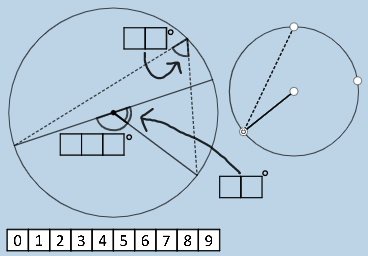
This example demonstrates the relationship between inscribed angles and central angles in a circle. It uses geometric constructions to illustrate angle properties. Key concepts include circle theorems, angle relationships, and geometric construction techniques. The construction involves GeoGebra commands such as Polygon, Circle, Intersect, and others. Suitable for middle or high school mathematics education to understand angle relationships in geometric figures.
GeoGebra Commands & Parameters
Polygon(A0, B, 4) → poly0, f, g, h, i, A, CPolygon(A3, H, 4) → poly3, j, k, l, m, E, GPolygon(A7, P, 4) → poly7, n, p, q, r, I, KPolygon(A1, D, 4) → poly1, s, t, a, b, M, OPolygon(A6, N, 4) → poly6, c, d, e, f_1, Q, SPolygon(A2, H2, 4) → poly2, k_1, l_1, m_1, n_1, W, ZPolygon(A8, A8 + (2, 0), 4) → poly8, g_1, h_1, i_1, j_1, U, VPolygon(A9, T, 4) → poly9, p_1, q_1, r_1, s_1, A_1, B_1Polygon(A4, J, 4) → poly4, t_1, a_1, b_1, c_1, C_1, D_1Polygon(A5, L, 4) → poly5, d_1, e_1, f_2, g_2, E_1, F_1Polygon(K_1, L_1, 4) → poly10, l_2, m_2, n_2, p_2, M_1, N_1Polygon(O_1, P_1, 4) → poly12, q_2, r_2, s_2, t_2, Q_1, R_1Polygon(S_1, T_1, 4) → poly13, a_2, b_2, c_2, d_2, U_1, V_1Polygon(C_2, D_2, 4) → poly15, i_3, j_3, k_3, l_3, E_2, F_2Polygon(G_2, H_2, 4) → poly16, m_3, n_3, p_3, q_3, I_2, J_2Polygon(G_{3}, H_{3}, 4) → poly17, m_{4}, n_{4}, p_{4}, q_{4}, I_{3}, J_{3}Polygon(C_{3}, D_{3}, 4) → poly14, i_{4}, j_{4}, k_{4}, l_{4}, E_{3}, F_{3}If(aleft > aright, "Left side is bigger.", aleft < aright, "Right side is bigger", "Both sides are equal!") → text9nCr(4, 2) → wIf(o_1 ≟ 0, p15 / p10, ((-p15)) / p10) → u_2If(u_1 ≟ 0, p12 / p13, ((-p12)) / p13) → v_2If(w_1 ≟ 0, p17 / p14, ((-p17)) / p14) → w_2If(o_2 ≟ 0, p16, (-p16)) → b_3Polygon(T_2, U_2, 4) → poly11, s_3, t_3, a_3, c_3, V_2, W_2Polygon(Z_2, A_3, 4) → poly18, d_3, e_3, f_4, g_4, B_3, M_3Circle(N_3, O_3) → c_4Point(c_4) → P_3Point(c_4) → Q_3Point(c_4) → R_3Point(c_4) → S_3Circle(A_2, B_2) → e_2Point(e_2) → O_2Point(e_2) → P_2Rotate(P_2, (((100 * p13) + (10 * p12) + p16) * pi / 180), O_2) → R_2Ray(O_2, R_2) → i_2Intersect(e_2, i_2, 2) → S_2Rotate(O_2, ((-((10 * p14) + p18)) * pi / 180), P_2) → T_3Ray(P_2, T_3) → j_2Intersect(e_2, j_2, 2) → U_3Rotate(P_2, ((-((10 * p11) + p17)) * pi / 180), U_3) → V_3Ray(U_3, V_3) → g_3Intersect(e_2, g_3, 2) → W_3Rotate(O_2, (((10 * p15) + p10) * pi / 180), S_2) → Z_3Ray(S_2, Z_3) → r_3Intersect(e_2, r_3, 2) → A_4Point(c_4) → B_4Point(c_4) → C_4Point(c_4) → D_4Segment(B_4, C_4) → h_4Segment(B_4, D_4) → r_4Segment(E_4, C_4) → s_4Segment(E_4, D_4) → t_4Angle(C_4, E_4, D_4) → εAngle(C_4, B_4, D_4) → ζSegment(A_2, P_2) → h_2Segment(O_2, P_2) → k_2Rotate(P_2, (((100 * p14) + (10 * p18) + p11) * pi / 180), O_2) → G_4Ray(O_2, G_4) → h_3Mirror(C_4, E_4) → I_4Intersect(s_4, t_4) → J_4Segment(J_4, I_4) → b_4Angle(D_4, J_4, I_4) → γAttachCopyToView(PolyLine[(1.8489,-1.6851), (1.8073,-1.5604), (1.0176,-0.85381), (0.68514,-0.52131), (0.51889,-0.31350), (0.35264,-0.18881), (0.10327,-0.022561), (-0.27079,0.30994), (-0.64485,0.60087), (-0.91501,0.82947), (-1.7670,1.3074), (-2.3074,1.5984), (-2.6398,1.7231), (-2.8892,1.8477), (-3.1594,1.9309), (-3.4711,2.0971), (-3.7205,2.1802), (-4.1777,2.4712), (-4.4270,2.5959), (-4.6348,2.6790), (-4.8842,2.8452), (-5.1336,2.9699), (-5.3414,3.0531), (-5.6323,3.1362), (-5.8817,3.1777), (-6.0895,3.2609), (-6.3597,3.2816), (-6.5467,3.3440), (-6.7130,3.3440), (-6.9416,3.3648), (-7.2533,3.4271), (-7.2533,3.1362), (-7.0455,2.6374), (-6.8792,2.2842), (-7.0455,2.6374), (-7.2117,3.0531), (-7.2741,3.3232), (-7.3780,3.5102), (-7.2325,3.7181), (-7.0455,3.8012), (-6.8792,3.9259), (-6.5883,4.1337), (-6.2973,4.3415), (NaN,NaN), true], 1, (-20.67793434487736, -14.694090934187248), (21.216971492055066, 14.60740570771501), (0, 705), (1008, 0)) → stroke2AttachCopyToView(PolyLine[(-7.0455,9.6170), (-7.0455,9.4100), (-7.0455,9.1600), (-7.0455,8.9524), (-7.0039,8.7446), (-6.9208,8.5368), (-6.8584,8.3082), (-6.6922,7.9965), (-6.4428,7.6224), (-6.1519,7.3938), (-5.8817,7.2691), (-5.6323,7.2484), (-5.3206,7.3107), (-5.0089,7.5393), (-4.8011,7.6640), (-4.5933,7.8510), (-4.4063,8.1004), (-4.2608,8.3705), (-4.0738,8.5991), (-3.8659,8.6823), (-3.8036,8.4121), (-3.7620,8.1627), (-3.7205,7.9549), (-3.6373,7.7471), (-3.7620,8.0796), (-3.8867,8.4952), (-3.9283,8.7030), (-4.2816,8.6823), (-4.5517,8.6199), (-4.7595,8.6199), (-4.9258,8.6199), (NaN,NaN), true], 1, (-20.67793434487736, -14.694090934187248), (21.216971492055066, 14.60740570771501), (0, 705), (1008, 0)) → stroke1Rotate(P_2, (((100 * p13) + (10 * p12) + p16) * pi / 180), A_2) → F_4Segment(A_2, F_4) → f_3Angle(P_2, A_2, F_4) → αRotate(P_2, (((10 * p18) + p11) * pi / 180), O_2) → H_4Ray(O_2, H_4) → a_4Intersect(e_2, a_4, 2) → M_4Angle(P_2, O_2, H_4) → βSegment(O_2, M_4) → d_4Rotate(F_4, (((10 * p14) + p17) * pi / 180), A_2) → N_4Segment(A_2, N_4) → e_4Angle(F_4, A_2, N_4) → δ
AI Drawing Prompt Reference
Draw a circle with center O and radius r. Select four points A, B, C, and D on the circle and connect them to form quadrilateral ABCD. Choose another point P on the circle and draw line segment OP. Construct angles ∠APB and ∠CPD, and observe their size relationship. Construct an inscribed quadrilateral and demonstrate the relationship between the central angle and the inscribed angle.
The prompt above was compiled from the original drawing commands and is for reference only.