
Open Middle Inscribed Angle Exercise (1): Circle and Rhombus Exploration
Loading the math board and drawing, please wait…
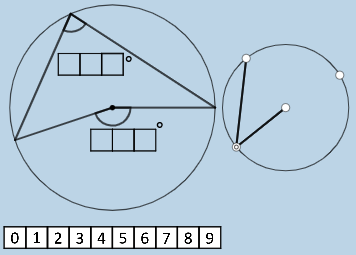
This GeoGebra example demonstrates a dynamic exploration of inscribed angles in a circle, where users can drag points on the circle to observe how the inscribed angle changes relative to its intercepted arc. The core mathematical concepts include the inscribed angle theorem, the relationship between central and inscribed angles, properties of a rhombus, and special points in geometry. The construction uses GeoGebra commands such as Polygon, Circle, Point, Rotate, Ray, Intersect, Segment, and Angle, along with conditional commands like If and combinatorial nCr, to create multiple auxiliary points (A0-A9, H, P) and image objects (pic1-pic10). It is suitable for middle school or high school geometry classes, particularly for teaching the inscribed angle theorem and promoting inquiry-based learning through open middle tasks that encourage reasoning and verification.
GeoGebra Commands & Parameters
Polygon(A0, B, 4) → poly0, f, g, h, i, A, CPolygon(A3, H, 4) → poly3, j, k, l, m, E, GPolygon(A7, P, 4) → poly7, n, p, q, r, I, KPolygon(A1, D, 4) → poly1, s, t, a, b, M, OPolygon(A6, N, 4) → poly6, c, d, e, f_1, Q, SPolygon(A2, H2, 4) → poly2, k_1, l_1, m_1, n_1, W, ZPolygon(A8, A8 + (2, 0), 4) → poly8, g_1, h_1, i_1, j_1, U, VPolygon(A9, T, 4) → poly9, p_1, q_1, r_1, s_1, A_1, B_1Polygon(A4, J, 4) → poly4, t_1, a_1, b_1, c_1, C_1, D_1Polygon(A5, L, 4) → poly5, d_1, e_1, f_2, g_2, E_1, F_1Polygon(K_1, L_1, 4) → poly10, l_2, m_2, n_2, p_2, M_1, N_1Polygon(O_1, P_1, 4) → poly12, q_2, r_2, s_2, t_2, Q_1, R_1Polygon(S_1, T_1, 4) → poly13, a_2, b_2, c_2, d_2, U_1, V_1Polygon(C_2, D_2, 4) → poly15, i_3, j_3, k_3, l_3, E_2, F_2Polygon(G_2, H_2, 4) → poly16, m_3, n_3, p_3, q_3, I_2, J_2Polygon(G_{3}, H_{3}, 4) → poly17, m_{4}, n_{4}, p_{4}, q_{4}, I_{3}, J_{3}Polygon(C_{3}, D_{3}, 4) → poly14, i_{4}, j_{4}, k_{4}, l_{4}, E_{3}, F_{3}If(aleft > aright, "Left side is bigger.", aleft < aright, "Right side is bigger", "Both sides are equal!") → text9nCr(4, 2) → wIf(o_1 ≟ 0, p15 / p10, ((-p15)) / p10) → u_2If(u_1 ≟ 0, p12 / p13, ((-p12)) / p13) → v_2If(w_1 ≟ 0, p17 / p14, ((-p17)) / p14) → w_2If(o_2 ≟ 0, p16, (-p16)) → b_3Polygon(T_2, U_2, 4) → poly11, s_3, t_3, a_3, c_3, V_2, W_2Polygon(Z_2, A_3, 4) → poly18, d_3, e_3, f_4, g_4, B_3, M_3Circle(N_3, O_3) → c_4Point(c_4) → P_3Point(c_4) → Q_3Point(c_4) → R_3Point(c_4) → S_3Circle(A_2, B_2) → e_2Point(e_2) → O_2Point(e_2) → P_2Rotate(P_2, (((100 * p13) + (10 * p12) + p16) * pi / 180), O_2) → R_2Ray(O_2, R_2) → i_2Intersect(e_2, i_2, 2) → S_2Rotate(O_2, ((-((10 * p14) + p18)) * pi / 180), P_2) → T_3Ray(P_2, T_3) → j_2Intersect(e_2, j_2, 2) → U_3Rotate(P_2, ((-((10 * p11) + p17)) * pi / 180), U_3) → V_3Ray(U_3, V_3) → g_3Intersect(e_2, g_3, 2) → W_3Rotate(O_2, (((10 * p15) + p10) * pi / 180), S_2) → Z_3Ray(S_2, Z_3) → r_3Intersect(e_2, r_3, 2) → A_4Point(c_4) → B_4Point(c_4) → C_4Point(c_4) → D_4Segment(B_4, C_4) → h_4Segment(B_4, D_4) → r_4Segment(E_4, C_4) → s_4Segment(E_4, D_4) → t_4Angle(C_4, E_4, D_4) → εAngle(C_4, B_4, D_4) → ζSegment(A_2, P_2) → h_2Segment(O_2, P_2) → k_2Rotate(P_2, (((100 * p13) + (10 * p12) + p16) * pi / 180), A_2) → F_4Segment(A_2, F_4) → f_3Angle(P_2, A_2, F_4) → αRotate(P_2, (((100 * p14) + (10 * p18) + p11) * pi / 180), O_2) → G_4Ray(O_2, G_4) → h_3Intersect(e_2, h_3, 2) → H_4Segment(O_2, H_4) → a_4Angle(P_2, O_2, H_4) → β
AI Drawing Prompt Reference
Create a geometric exploration involving circles and inscribed angles. Draw a large circle with multiple points on its circumference connected to form several quadrilaterals distributed around the center, with some quadrilaterals showing rhombus characteristics. Use rotation and ray constructions to generate auxiliary points on the circle, creating complex geometric relationships. The diagram includes multiple polygon objects with angle and side length comparisons, displaying conditional comparison results. The visualization demonstrates the inscribed angle theorem, the relationship between central and inscribed angles, and properties of quadrilaterals, suitable for geometric inquiry and verification.
The prompt above was compiled from the original drawing commands and is for reference only.