
Open Middle Cyclic Quadrilateral Exercise
Loading the math board and drawing, please wait…
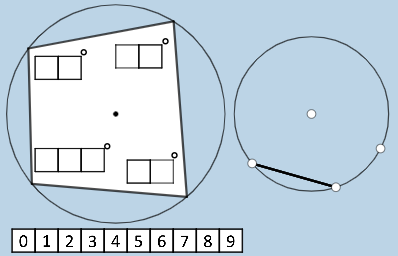
This example demonstrates the construction of a cyclic quadrilateral using geometric properties. Key mathematical concepts include cyclic quadrilaterals, angle relationships, rotation, and coordinate transformations. The construction involves GeoGebra commands such as Polygon, Rotate, Circle, and Point. Suitable for middle or high school students to understand the relationship between quadrilaterals and circles, and to explore dynamic geometric applications.
GeoGebra Commands & Parameters
Polygon(A0, B, 4) → poly0, f, g, h, i, A, CPolygon(A3, H, 4) → poly3, j, k, l, m, E, GPolygon(A7, P, 4) → poly7, n, p, q, r, I, KPolygon(A1, D, 4) → poly1, s, t, a, b, M, OPolygon(A6, N, 4) → poly6, c, d, e, f_1, Q, SPolygon(A2, H2, 4) → poly2, k_1, l_1, m_1, n_1, W, ZPolygon(A8, A8 + (2, 0), 4) → poly8, g_1, h_1, i_1, j_1, U, VPolygon(A9, T, 4) → poly9, p_1, q_1, r_1, s_1, A_1, B_1Polygon(A4, J, 4) → poly4, t_1, a_1, b_1, c_1, C_1, D_1Polygon(A5, L, 4) → poly5, d_1, e_1, f_2, g_2, E_1, F_1Polygon(K_1, L_1, 4) → poly10, l_2, m_2, n_2, p_2, M_1, N_1Polygon(O_1, P_1, 4) → poly12, q_2, r_2, s_2, t_2, Q_1, R_1Polygon(S_1, T_1, 4) → poly13, a_2, b_2, c_2, d_2, U_1, V_1Polygon(C_2, D_2, 4) → poly15, i_3, j_3, k_3, l_3, E_2, F_2Polygon(G_2, H_2, 4) → poly16, m_3, n_3, p_3, q_3, I_2, J_2Polygon(G_{3}, H_{3}, 4) → poly17, m_{4}, n_{4}, p_{4}, q_{4}, I_{3}, J_{3}Polygon(C_{3}, D_{3}, 4) → poly14, i_{4}, j_{4}, k_{4}, l_{4}, E_{3}, F_{3}If(aleft > aright, "Left side is bigger.", aleft < aright, "Right side is bigger", "Both sides are equal!") → text9nCr(4, 2) → wIf(o_1 ≟ 0, p15 / p10, ((-p15)) / p10) → u_2If(u_1 ≟ 0, p12 / p13, ((-p12)) / p13) → v_2If(w_1 ≟ 0, p17 / p14, ((-p17)) / p14) → w_2If(o_2 ≟ 0, p16, (-p16)) → b_3Polygon(T_2, U_2, 4) → poly11, s_3, t_3, a_3, c_3, V_2, W_2Polygon(Z_2, A_3, 4) → poly18, d_3, e_3, f_4, g_4, B_3, M_3Circle(N_3, O_3) → c_4Point(c_4) → P_3Point(c_4) → Q_3Point(c_4) → R_3Point(c_4) → S_3Polygon(S_3, P_3, Q_3, R_3) → q1, h_4, r_4, s_4, t_4Segment(Q_3, R_3) → a_4Segment(R_3, S_3) → b_4Segment(S_3, P_3) → d_4Segment(P_3, Q_3) → e_4Circle(A_2, B_2) → e_2Point(e_2) → O_2Point(e_2) → P_2Segment(O_2, P_2) → h_2Rotate(P_2, (((100 * p13) + (10 * p12) + p16) * pi / 180), O_2) → R_2Ray(O_2, R_2) → i_2Intersect(e_2, i_2, 2) → S_2Rotate(O_2, ((-((10 * p14) + p18)) * pi / 180), P_2) → T_3Ray(P_2, T_3) → j_2Intersect(e_2, j_2, 2) → U_3Segment(O_2, S_2) → k_2Segment(P_2, U_3) → f_3Rotate(P_2, ((-((10 * p11) + p17)) * pi / 180), U_3) → V_3Ray(U_3, V_3) → g_3Intersect(e_2, g_3, 2) → W_3Angle(P_2, O_2, S_2) → αAngle(U_3, P_2, O_2) → βAngle(W_3, U_3, P_2) → γSegment(U_3, W_3) → h_3Rotate(O_2, (((10 * p15) + p10) * pi / 180), S_2) → Z_3Ray(S_2, Z_3) → r_3Intersect(e_2, r_3, 2) → A_4Angle(A_4, S_2, O_2) → δSegment(S_2, A_4) → f_5
AI Drawing Prompt Reference
Draw a dynamic cyclic quadrilateral exploration. Start with a large circle and place four points on it, connecting them to form a quadrilateral. Then, construct multiple squares on each side of the quadrilateral, arranged around the circle. Next, add an auxiliary circle outside, place points on it, and create rotated rays to form angle relationships. Finally, include text comparing the sizes of left and right values, and show a combination calculation result. The overall figure illustrates relationships among circles, polygons, angle transformations, and area comparisons.
The prompt above was compiled from the original drawing commands and is for reference only.