
Open Middle: Building Rectangles
Loading the math board and drawing, please wait…
In collections
Open Middle: Building Special Quadrilaterals
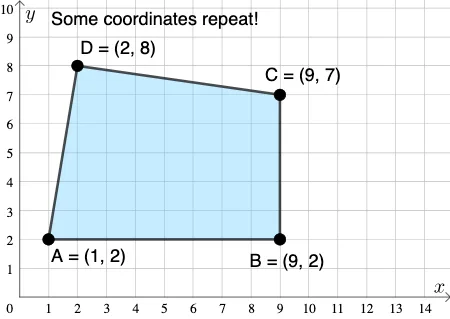
This GeoGebra example demonstrates how to construct rectangles on a coordinate plane by placing points, and encourages exploring multiple valid solutions under given constraints. Core mathematical concepts include coordinate geometry, properties of rectangles (opposite sides parallel and equal, four right angles), the relationship between parallelograms and rectangles, arithmetic operations, and optimization thinking. Construction details: using GeoGebra commands such as PointIn to place points, Polygon to form shapes, Segment to draw edges, Mode to switch tools, and If for conditional logic; objects include points A, B, C, D, sides a, b, c, d, auxiliary segments f, g, h, i, length variables l1, l2, and text1. Suitable for upper middle school or high school students, this activity supports open-ended problem solving, geometric reasoning, and verifying rectangle conditions from multiple approaches.
GeoGebra Commands & Parameters
PointIn(e) → APointIn(e) → BPointIn(e) → CPointIn(e) → DPolygon(A, B, C, D) → q1, a_1, b_1, c_1, d_1Segment(A, B) → fSegment(B, C) → gSegment(C, D) → hSegment(D, A) → iMode(l1) → l2If(Length[l2] ≟ 0, "No repeated coordinates.", "Some coordinates repeat!") → text1
AI Drawing Prompt Reference
Construct a quadrilateral on a coordinate plane by clicking to place four points, and check if it forms a rectangle. Display the four sides of the quadrilateral and label their lengths. Show a message if the coordinates of the points are repeated. Explore different point placements to find multiple valid solutions that satisfy the rectangle conditions.
The prompt above was compiled from the original drawing commands and is for reference only.