
Octagon to Square Dissection by Steve Phelps
Loading the math board and drawing, please wait…
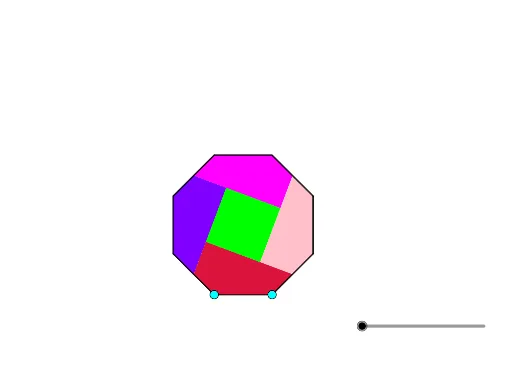
This example demonstrates how to dissect an octagon and reassemble it into a square. Key mathematical concepts include properties of polygons and area calculations. The construction uses GeoGebra commands such as Polygon, Line, Midpoint, etc. Suitable for middle school and above students to learn about the area transformation between polygons and squares.
GeoGebra Commands & Parameters
Polygon(A, B, 8) → poly1, f, D, E, F, G, H, g, h, i, j, k, l, m, CLine(E, F) → k_1Midpoint(g) → MMidpoint(i) → JCircle(J, Segment[A, B]) → cIntersect(c, j, 1) → KMidpoint(m) → ILine(I, K) → nOrthogonalLine(M, n) → rIntersect(n, r) → NLine(J, n) → pIntersect(p, r) → OPolygon(N, O, 4) → poly2, s, t, a, b, P, QLine(P, Q) → r_1Angle(k_1, r_1) → αIf(2 ≤ u < 3, Translate[poly2, Vector[N, Dilate[N, 3 - u, F]]], Translate[poly2, Vector[N, F]]) → q1Midpoint(k) → LOrthogonalLine(L, p) → qPolygon(P, L, F, E, J) → poly3, p_1, l_1, f_1, e, j_1Polygon(O, M, C, D, J) → poly4, o, m_1, c_1, d, j_2Polygon(M, N, I, A, B) → poly5, m_2, n_1, i_1, a_1, b_1Polygon(I, H, G, L, Q) → poly6, i_2, h_1, g_1, l_2, q_1If(0 ≤ u < 1, Polygon[Rotate[O, (u * π), J], Rotate[M, (u * π), J], Rotate[C, (u * π), J], Rotate[D, (u * π), J], Rotate[J, (u * π), J]], Polygon[Rotate[O, π, J], Rotate[M, π, J], Rotate[C, π, J], Rotate[D, π, J], Rotate[J, π, J]]) → poly7If(0 ≤ u < 1, Polygon[Rotate[I, ((-u) * π), L], Rotate[H, ((-u) * π), L], Rotate[G, ((-u) * π), L], Rotate[L, ((-u) * π), L], Rotate[Q, ((-u) * π), L]], Polygon[Rotate[I, π, L], Rotate[H, π, L], Rotate[G, π, L], Rotate[L, π, L], Rotate[Q, π, L]]) → poly8If(0 ≤ u < 1, Rotate[I, ((-u) * π), L], Rotate[I, π, L]) → RIf(0 ≤ u < 1, Polygon[Rotate[M, ((-u) * π), L], Rotate[N, ((-u) * π), L], Rotate[I, ((-u) * π), L], Rotate[A, ((-u) * π), L], Rotate[B, ((-u) * π), L]], Polygon[Rotate[M, π, L], Rotate[N, π, L], Rotate[I, π, L], Rotate[A, π, L], Rotate[B, π, L]]) → poly9If(3 ≤ u, Rotate[q1, ((u - 3) * α), F], Rotate[q1, α, F]) → q2If(0 ≤ u < 1, Rotate[poly9, ((-u) * π), R], Rotate[poly9, π, R]) → poly10
AI Drawing Prompt Reference
Start by drawing a regular octagon. Then, draw two of its diagonals and find their midpoints, drawing perpendicular lines from these midpoints. Use these perpendicular lines and midpoints to construct several triangles and quadrilaterals. Finally, through translation and rotation, reassemble these shapes into a square.
The prompt above was compiled from the original drawing commands and is for reference only.