
NS2-02-XT2 (Like terms across groups)
Loading the math board and drawing, please wait…
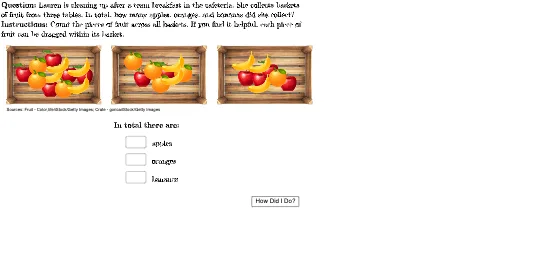
This GeoGebra example uses three baskets of fruits (apples, oranges, bananas) to visually demonstrate the concept of combining like terms across different groups. The core mathematical idea is identifying terms with the same variable part (e.g., apples from different baskets) and merging them into a single term to simplify algebraic expressions. The construction employs commands such as Polygon to draw basket outlines, PointIn to place fruit images, Join and Zip to combine objects, Textfield and TableText to display data and results, and LaTeX for formula typesetting. It is suitable for middle school students learning algebraic simplification, and can be used by teachers for classroom demonstrations or by students for self-exploration, providing a visual grouping approach to understand the rules of combining like terms.
GeoGebra Commands & Parameters
LaTeX(UnicodeToLetter[10003]) → cmarkLaTeX(UnicodeToLetter[10007]) → xmarkPolygon({(-8, 2), (-8, 6.5), (1.5, 6.5), (1.5, 2)}) → basket1quadPointIn(basket1quad) → basket1apple1PointIn(basket1quad) → basket1apple2PointIn(basket1quad) → basket1apple3PointIn(basket1quad) → basket1apple4PointIn(basket1quad) → basket1apple5PointIn(basket1quad) → basket1orange1PointIn(basket1quad) → basket1orange2PointIn(basket1quad) → basket1orange3PointIn(basket1quad) → basket1banana1PointIn(basket1quad) → basket1banana2PointIn(basket1quad) → basket1banana3PointIn(basket1quad) → basket1banana4Polygon({(22, 2), (22, 6.5), (31.5, 6.5), (31.5, 2)}) → basket3quadPointIn(basket3quad) → basket3apple1PointIn(basket3quad) → basket3apple2PointIn(basket3quad) → basket3apple3PointIn(basket3quad) → basket3apple4PointIn(basket3quad) → basket3banana1PointIn(basket3quad) → basket3banana2PointIn(basket3quad) → basket3banana3PointIn(basket3quad) → basket3orange1Join({Sequence[(("SetLayer(imgBasket1apple" * q) * ", 8)"), q, 1, numBasket1apples], Sequence[(("SetLayer(imgBasket1orange" * q) * ", 8)"), q, 1, numBasket1oranges], Sequence[(("SetLayer(imgBasket1banana" * q) * ", 8)"), q, 1, numBasket1bananas]}) → basket1LayerCommandsJoin({Sequence[(("SetLayer(imgBasket2apple" * q) * ", 8)"), q, 1, numBasket2apples], Sequence[(("SetLayer(imgBasket2orange" * q) * ", 8)"), q, 1, numBasket2oranges], Sequence[(("SetLayer(imgBasket2banana" * q) * ", 8)"), q, 1, numBasket2bananas]}) → basket2LayerCommandsJoin({Sequence[(("SetLayer(imgBasket3apple" * q) * ", 8)"), q, 1, numBasket3apples], Sequence[(("SetLayer(imgBasket3orange" * q) * ", 8)"), q, 1, numBasket3oranges], Sequence[(("SetLayer(imgBasket3banana" * q) * ", 8)"), q, 1, numBasket3bananas]}) → basket3LayerCommandsPolygon({(7, 2), (7, 6.5), (16.5, 6.5), (16.5, 2)}) → basket2quadPointIn(basket2quad) → basket2apple1PointIn(basket2quad) → basket2apple2PointIn(basket2quad) → basket2banana1PointIn(basket2quad) → basket2banana2PointIn(basket2quad) → basket2orange1PointIn(basket2quad) → basket2orange2PointIn(basket2quad) → basket2orange3PointIn(basket2quad) → basket2orange4LaTeX((((("\text{" * QUESTION) * "\\") * INSTRUCTIONS) * "}")) → TEXTZip(A ≟ Text[B], A, {textApples, textOranges, textBananas}, B, {totalApples, totalOranges, totalBananas}) → totalCorrectnessLaTeX("\textbf{In total there are:}") → headerTextfield(textApples) → ansBoxApplesTextfield(textBananas) → ansBoxBananasTextfield(textOranges) → ansBoxOrangesTableText({totalApples, totalOranges, totalBananas}, {"\text{\vphantom{\dfrac{1}{2}}apples}", "\text{\vphantom{\dfrac{1}{2}}oranges}", "\text{\vphantom{\dfrac{1}{2}}bananas}"}, If[isChecked, Zip[If[A, (("\textcolor{#254117}{" * cmark) * "}"), (("\textcolor{#e41b17}{" * xmark) * "}")], A, totalCorrectness]], "v") → table
AI Drawing Prompt Reference
Draw a graphic with three rectangular containers. Place apple, orange, and banana icons inside each container. The containers should be arranged neatly, with icons distinguished by color or label. The graphic should clearly show the containers and their contents to help understand the concept of combining like terms.
The prompt above was compiled from the original drawing commands and is for reference only.