
NS1-02-XT1 (Product of Powers)
Loading the math board and drawing, please wait…
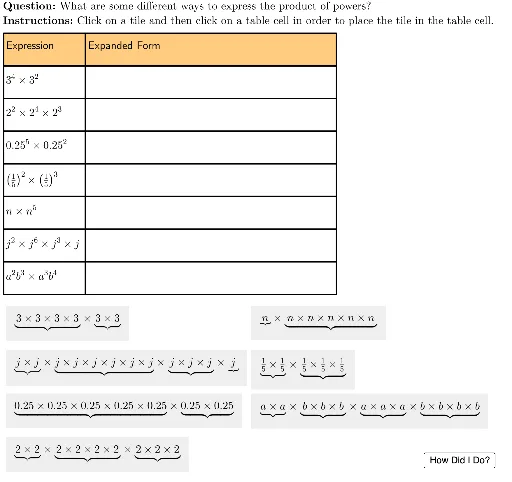
This interactive GeoGebra example demonstrates the product rule for exponents through a dynamic table and instant feedback. It visually shows that when multiplying powers with the same base, the exponents add: a^m × a^n = a^(m+n). The construction uses commands such as Sequence, Element, UnicodeToLetter, and LaTeX to generate exponential expressions with proper superscript formatting. Multiple objects (O2, O8, G8, etc.) manage the display of exponential and expanded forms, while buttons (TryAnother) and checkboxes (isChecked) provide randomized practice and immediate correctness checks. The table layout is controlled by parameters like tableAnchor, rowHeight, and col1Width for a clean interface. This resource is ideal for middle or high school students learning exponent rules, supporting inquiry-based discovery and self-paced practice.
GeoGebra Commands & Parameters
Sequence(Polygon[tableAnchor + (col1Width, 0 - (rowHeight * i)), tableAnchor + (col1Width + col2Width, 0 - (rowHeight * i)), tableAnchor + (col1Width + col2Width, 0 - (rowHeight * i) - rowHeight), tableAnchor + (col1Width, ((-rowHeight) * i) - rowHeight)], i, 0, lastRow - 1) → tableCol2Element(tableCol2, 2) → E2UnicodeToLetter(10003) → cmarkUnicodeToLetter(10007) → xmarkSequence(Polygon[tableAnchor + (0, 0 - (rowHeight * i)), tableAnchor + (col1Width, 0 - (rowHeight * i)), tableAnchor + (col1Width, 0 - (rowHeight * i) - rowHeight), tableAnchor + (0, ((-rowHeight) * i) - rowHeight)], i, 0, lastRow - 1) → tableCol1Element(tableCol1, 1) → B1Element(tableCol1, 2) → B2Element(tableCol1, 3) → B3Element(tableCol1, 4) → B4Element(tableCol1, 5) → B5Element(tableCol1, 6) → B6Element(tableCol2, 1) → E1Element(tableCol2, 3) → E3Element(tableCol2, 4) → E4Element(tableCol2, 5) → E5Element(tableCol2, 6) → E6Sequence(Polygon[tableAnchor + (col1Width + col2Width, 0 - (rowHeight * i)), tableAnchor + (col1Width + col2Width + col3Width, 0 - (rowHeight * i)), tableAnchor + (col1Width + col2Width + col3Width, 0 - (rowHeight * i) - rowHeight), tableAnchor + (col1Width + col2Width, ((-rowHeight) * i) - rowHeight)], i, 0, lastRow - 1) → tableCol3Element(tableCol3, 1) → M1Element(tableCol3, 2) → M2Element(tableCol3, 3) → M3Element(tableCol3, 4) → M4Element(tableCol3, 5) → M5Element(tableCol3, 6) → M6LaTeX("\text{Expression}") → A1LaTeX("3^4 \times 3^2") → A2LaTeX("2^2 \times 2^4 \times 2^3") → A3LaTeX("0.25^5 \times 0.25^2") → A4LaTeX("\left(\tfrac{1}{5}\right)^2 \times \left(\tfrac{1}{5}\right)^3") → A5LaTeX("n \times n^5") → A6LaTeX("j^2 \times j^6 \times j^3 \times j") → A7LaTeX("a^2b^3 \times a^3b^4") → A8Element(tableCol1, 7) → B7Element(tableCol1, 8) → B8LaTeX("\text{Expanded Form}") → C1Element(tableCol2, 7) → E7Element(tableCol2, 8) → E8LaTeX("\text{Exponential Form}") → K1Element(tableCol3, 7) → M7Element(tableCol3, 8) → M8LaTeX("\text{\textbf{Question: }What are some different ways to express the product of powers?\\\textbf{Instructions: }Click on a tile and then click on a table cell in order to place the tile in the table cell.}") → TEXTLaTeX("\text{You expanded and simplified the product of powers.}") → feedbackFinal
AI Drawing Prompt Reference
Create an interactive table for practicing the product of powers rule. The table has three columns: the first shows exponential expressions like 3^4 × 3^2, 2^2 × 2^4 × 2^3, and 0.25^5 × 0.25^2; the second column shows expanded forms; the third shows exponential forms. Above the table, place headers 'Expression', 'Expanded Form', and 'Exponential Form'. Include a question and instruction text: 'What are some different ways to express the product of powers? Click on a tile and then click on a table cell to place the tile.' At the bottom, add feedback text: 'You expanded and simplified the product of powers.' Ensure the table has a clean layout with fixed row height and column widths.
The prompt above was compiled from the original drawing commands and is for reference only.