
Notable Elements of a Triangle
Loading the math board and drawing, please wait…
In collections
Besondere Punkte/Special Points
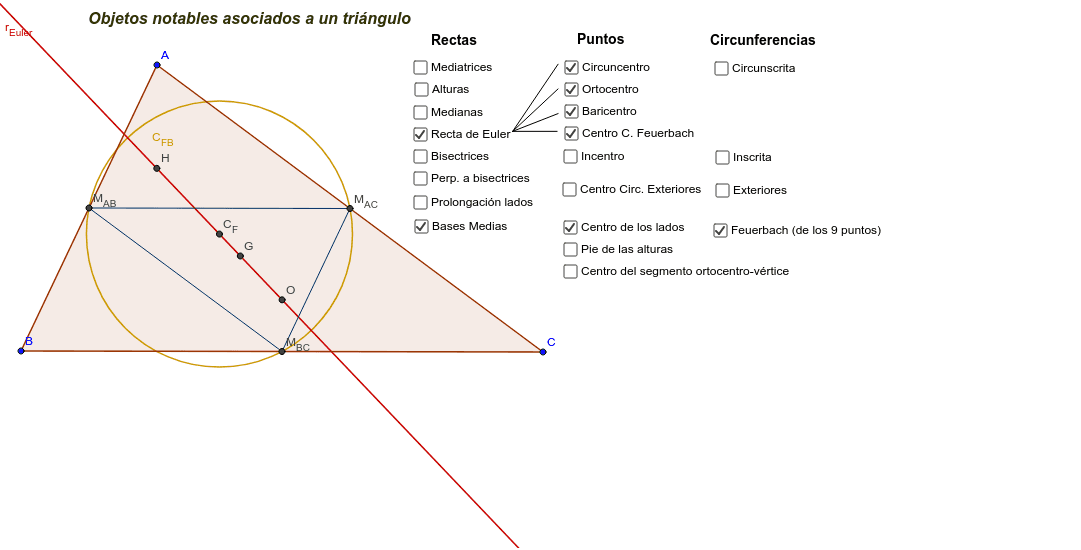
This interactive GeoGebra example visualizes the principal notable elements associated with any triangle. It demonstrates the centroid, orthocenter, circumcenter, incenter, and the Euler line, along with related circles such as the circumcircle, incircle, and nine-point circle. Users can drag the triangle's vertices to dynamically observe how these points and lines change. Core mathematical concepts include the five centers of a triangle, perpendicular bisectors, angle bisectors, altitudes, medians, and the Euler line. The construction uses GeoGebra commands: Polygon to create the triangle, LineBisector for perpendicular bisectors, Intersect to find circumcenter, AngularBisector for incenter, OrthogonalLine for altitudes (orthocenter), Midpoint and Segment for medians (centroid), and Circle for circumcircle, incircle, and Euler circle. Suitable for middle school and high school geometry classes, math competitions, and introductory college geometry, this example helps students deeply understand the properties and constructions of triangle centers.
GeoGebra Commands & Parameters
Polygon(A, B, C) → poly1, c, a, bLineBisector(a) → m_{BC}LineBisector(c) → m_{AB}LineBisector(b) → m_{AC}Intersect(m_{AC}, m_{BC}) → OAngularBisector(a, c) → pb_{ac}, b_2AngularBisector(a, b) → pb_{ab}, b_3AngularBisector(b, c) → pb_{bc}, b_4Intersect(b_2, b_4) → ICircle(I, Distance[I, c]) → C_{ins}OrthogonalLine(A, a) → h_AOrthogonalLine(C, c) → h_COrthogonalLine(B, b) → h_BIntersect(h_C, h_A) → HLine(B, Midpoint[b]) → m_BLine(A, Midpoint[a]) → m_ALine(C, Midpoint[c]) → m_CIntersect(m_A, m_B) → GCircle(O, C) → C_{circ}Line(H, O) → r_{Euler}Midpoint(c) → M_{AB}Midpoint(b) → M_{AC}Midpoint(a) → M_{BC}Circle(M_{AB}, M_{BC}, M_{AC}) → C_{FB}Intersect(h_C, c) → P_{AB}Intersect(h_B, b) → P_{AC}Intersect(h_A, a) → P_{BC}Midpoint(H, A) → P_AMidpoint(H, B) → P_BMidpoint(H, C) → P_CSegment(D, E) → a_1Segment(D, F) → b_1Segment(D, J) → c_1Intersect(C_{FB}, r_{Euler}) → P_{EF1}, P_{EF2}Midpoint(P_{EF1}, P_{EF2}) → C_{F}Segment(D, K) → e_1Intersect(pb_{bc}, pb_{ab}) → C_{b}Intersect(pb_{ac}, pb_{ab}) → C_{a}Intersect(pb_{bc}, pb_{ac}) → C_{C}Circle(C_{C}, Distance[C_{C}, c]) → Ext_{C}Circle(C_{b}, Distance[C_{b}, b]) → Ext_{b}Circle(C_{a}, Distance[C_{a}, a]) → Ext_{a}Segment(M_{AB}, M_{BC}) → b_{ac}Segment(M_{BC}, M_{AC}) → b_{ab}Segment(M_{AC}, M_{AB}) → b_{bc}Line(A, C) → r_{AC}Line(C, B) → r_{BC}Line(B, A) → r_{AB}
AI Drawing Prompt Reference
Draw an arbitrary triangle and show its five principal centers: centroid, orthocenter, circumcenter, incenter, and nine-point center. Construct the perpendicular bisectors of the three sides, intersecting at the circumcenter; the angle bisectors meeting at the incenter; the altitudes meeting at the orthocenter; and the medians meeting at the centroid. Draw the circumcircle centered at the circumcenter passing through the vertices, the incircle centered at the incenter, and the nine-point circle passing through the side midpoints, the altitude feet, and the midpoints between the orthocenter and each vertex. Connect the orthocenter and circumcenter to form the Euler line, which also passes through the centroid and nine-point center. Finally, add the three excircles with their centers, and connect the side midpoints to form the medial triangle. All elements should update dynamically as the vertices are dragged.
The prompt above was compiled from the original drawing commands and is for reference only.