
Normal Distribution Curve for Visual Hypothesis Testing
Loading the math board and drawing, please wait…
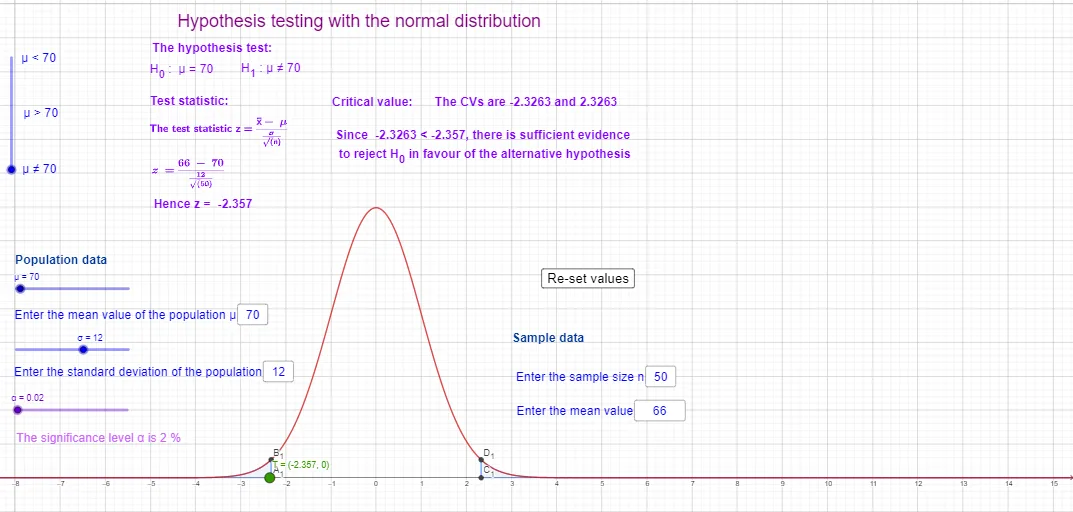
This example visualizes how hypothesis testing is determined using a normal distribution curve: it links the significance level (α), the critical values, and the rejection/critical regions by showing the corresponding tail probabilities. The mathematical core includes the normal distribution parameters (μ, σ), the use of the inverse normal (InverseNormal) to compute quantiles/critical points for a given α, and probability evaluation by integrating the normal density over selected intervals (Integral). In GeoGebra construction, Textfield is used for dynamic labels and annotations, InputBox objects provide interactive control of inputs such as μ, σ and test thresholds, and InverseNormal together with Normal generates the critical points and the distribution curve. Segments highlight key connections to the curve, while the regions defined by critical boundaries (e.g., multiple threshold points) are integrated to obtain tail areas, often displayed as percentages with accompanying text objects. Suitable for secondary to early university learners studying probability and hypothesis testing, and for interactive classroom demonstrations.
GeoGebra Commands & Parameters
Textfield(σ) → InputBox2Textfield(μ) → InputBox1InverseNormal(0, 1, α) → invϕ_1Normal(0, 1, x, false) → fSegment(A, B) → gIntegral(f, (-10^(10)), invϕ_1, true) → i_1Normal(μ, σ, invϕ_1, true) → i_2InverseNormal(0, 1, 1 - α) → invϕ_2Segment(C, D) → hIntegral(f, invϕ_2, 10^(10), true) → i_3Textfield(n) → InputBox3Textfield(x_1) → InputBox4InverseNormal(0, 1, α / 2) → invϕ_3InverseNormal(0, 1, 1 - α / 2) → invϕ_4Integral(f, invϕ_4, 10^(10), true) → i_7Integral(f, (-10^(10)), invϕ_3, true) → i_5Segment(A_1, B_1) → kSegment(C_1, D_1) → l
AI Drawing Prompt Reference
Create a visualization for hypothesis testing using a normal distribution curve. Include interactive inputs for mean μ, standard deviation σ, significance level α, and a test threshold x. Plot the normal density curve on a shared coordinate system. Determine critical points using inverse-normal quantiles for two tail levels (α and 1−α) and also for the split case (α/2 and 1−α/2), then mark these points on the curve and draw simple connecting segments to the corresponding probability locations. Shade or outline the tail regions under the curve bounded by the critical boundaries, and display the tail probabilities by integrating the density over those intervals, with nearby text labels showing key region/probability information as percentages.
The prompt above was compiled from the original drawing commands and is for reference only.