
Normal Distribution Curve and Area-Probability via Integration
Loading the math board and drawing, please wait…
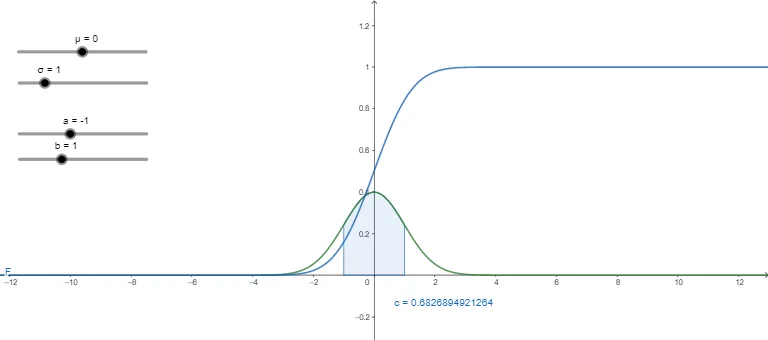
This GeoGebra example demonstrates how the normal (Gaussian) distribution density changes with the parameters μ (mean) and σ (standard deviation), and how probability over an interval corresponds to the area under the curve. Key concepts include the normal probability density function f(x), the cumulative/integrated quantity F(x), and the interpretation of definite integrals as probability mass. The construction uses the GeoGebra command Integral with objects a, b, μ, σ, f, c, and F: a and b serve as the integration bounds, f represents the density function, and F represents the resulting accumulated/integral value. The point/object c helps highlight key locations on the curve so learners can visually connect “area under f” with the computed integral. Suitable for high-school advanced study and early university topics in probability & statistics, as well as calculus-based understanding of definite integrals and function graphs.
GeoGebra Commands & Parameters
Integral(f, a, b) → c
AI Drawing Prompt Reference
Draw a normal distribution curve with adjustable mean and standard deviation using sliders. Show the probability density function and the cumulative distribution function. Mark the bounds of an integral on the curve and visually represent the integral result as the area under the curve, highlighting the relationship between the area and the computed integral value to illustrate the concept of definite integrals as probability.
The prompt above was compiled from the original drawing commands and is for reference only.